Blueprint Games
A guide to Blueprint Games - an engaging and interactive event that helps evaluate teamwork.
- Blueprint Games (Spring 2024)
- Blueprint Games (Fall 2023)
- Blueprint Games (Spring 2025)
- Blueprint Games Fall 2026
Blueprint Games (Spring 2024)
Your Task
Today, you will assume the role of a Blueprint developer. You and your team will work together to define project goals, deliverables, and features for a nonprofit, assuming you have ten weeks to implement your plan.
Don't worry — you won’t be writing any code today. Instead, your team will focus on understanding and discussing product needs, outlining key features, planning high-level user flows, and modeling your initial database needs.
✨ If you don't understand every part of the prompt, that's okay. Ask your team members (and E-Board) for help! This exercise is as much about your ability to collaborate as it is about your ability to work towards completing the task.
🥁 Drumroll… Introducing the nonprofit you’ll be working with today…
Invisible Hands
Invisible Hands is a community-based group of over 10,000 organizers and volunteers who deliver groceries, prescriptions, and other necessities to those at high risk during the COVID-19 pandemic, including the elderly, immunocompromised, sick, and disabled. Volunteers practice all safe distancing guidelines to keep ourselves and our communities safe, but become friends with the people to whom we deliver, socially engaging while physically distancing.
Given the urgency of the pandemic, the non-profit started to launch their service using the following model:
- Elderly individuals may submit delivery requests through Invisible Hands' online portal.
- The administrative team receives these requests from the portal and relays open deliveries to volunteers (runners) via Slack.
- Runners who are available will indicate that they are available for a given delivery.
- The administrative team sends the runner more detailed information about the items, then marks the delivery as "In Progress" on the online portal.
- When the runner completes the delivery, the administrative team sends a "Complete" notification on the online portal.

As you can see, processing deliveries is quite inefficient. To relay open deliveries to runners, data is passed through two platforms (online portal, Slack), and assigning deliveries is a manual matching performed by the administrative team.
The Goal
✨ Your challenge is to create a platform that enables a streamlined process of connecting delivery requests to volunteers. Consider the following questions:
- How can we leverage technology to eliminate (unnecessary) intermediaries?
- How can the data flow be more efficient?
The Users
- Elderly & Immunocompromised Individuals
- Volunteers (Runners)
- Administrative Team
Getting started
When Blueprint partners with a nonprofit, they describe the challenge they’re facing, and we’re free to decide how to tackle it. Today, you’re in Blueprint’s place. How you choose to approach this prompt is entirely up to you and your team. Just make sure you can provide solid justifications for your decisions. There’s no right answer—everything has tradeoffs.
Here are some questions to get you started.
- What kind of system do you think would fit best? Is it an app, a website? Or is it something else entirely?
- Consider the profile of a typical user. Are there any considerations that should be made when designing a new system for said user? How might these considerations affect the final deliverable?
- What features would be most valuable to the nonprofit and its end-users?
- How can you make sure it's feasible for your team to complete within the ten weeks?
- What should you focus on? What might you have to sacrifice?
When you’re ready to get started, duplicate this Google Doc and share it with your team members. The doc contains a few tips on how to take notes.
Deliverables
🌟 You will not be asked to present your final deliverables. We are more interested in seeing how you go about understanding and breaking down the problem than any polished final result.
Document any thoughts, drawings, or features as you work! At the end, you will submit everything your team has come up with.
That said, we aren't looking to see a beautiful polished design doc — we're most interested in your process, so feel free to include in-progress work and notes, and don't fret about the formatting.
Your team will submit the design doc (created earlier) which can include any artifacts you create or use throughout this process. This can include:
- brainstorming notes
- sketches
- screenshots or links to design mockups
- links to online sources
Tips
Helpful process to go about designing apps
- What features are most important?
- What information/data you need to build those features?
- How should this information/data be represented, and how much of that information is shown to users?
- What is the flow each user takes in order to access and manipulate this information?
- What would the screens look like to each of the users?
Understanding the end user
- How can we build in a way that creates an app that is accessible, simple to use, and easy to understand?
Good luck! 🙆
Blueprint Games (Fall 2023)
Your Task
Today, you will assume the role of a Blueprint developer. You and your team will work together to define project goals, deliverables, and features for a nonprofit, assuming you have ten weeks to implement your plan.
Don't worry — you won’t be writing any code today. Instead, your team will focus on understanding and discussing product needs, outlining key features, planning high-level user flows, and modeling your initial database needs. If you don't understand every part of the prompt, that's okay. Ask your team members for help! This exercise is as much about your ability to collaborate as it is about your ability to work towards completing the task.
🥁 Drumroll… Introducing the nonprofit you’ll be working with today…
Hoboken Family Planning Clinic
The Hoboken Family Planning first opened its doors for service on March 1, 1972. For over 40 years we have gained the trust and confidence of our patients and community by providing quality care to people with a wide range of backgrounds; from the uninsured to the underinsured, to Medicaid recipients and the fully insured in Hoboken and neighboring communities. Our main goal is to continue to provide education and services to help people manage their reproductive health, find chronic diseases, diagnose and treat sexually transmitted diseases and discover cancers at early and treatable stages.
—**http://www.hobfamplan.org/**
The Challenge
The clinic serves a significant population of undocumented mothers whose primary language is Spanish. Unfortunately, many of them are unaware of the free or affordable services offered by the clinic. The objective is to reach and serve this underserved demographic, regardless of their immigration status. There are three physical clinics located in Hoboken, Summit Center, and West New York. These clinics offer essential services such as pregnancy support, STI testing, and cancer screenings, covering a quarter of the entire state's needs, often at little to no cost.
The proposed project aims to introduce crucial features that will simplify individuals' access to the clinic's resources. These features will encompass an event management platform, real-time event updates, and easily comprehensible educational health resources.
The Goal
Your mission is to create an inclusive platform that not only raises awareness but also provides support to the clinic's existing patients.
The Users
- Individuals who make use of the Clinic’s services
- Hoboken Family Clinic Administrators
- Clinic Physicians
Getting started
When Blueprint partners with a nonprofit, they describe the challenge they’re facing, and we’re free to decide how to tackle it. Today, you’re in Blueprint’s place. How you choose to approach this prompt is entirely up to you and your team. Just make sure you can provide solid justifications for your decisions. There’s no right answer—everything has tradeoffs.
Here are some questions to get you started.
- What kind of system do you think would fit best? Is it an app, a website? Or is it something else entirely?
- Consider the profile of a typical user. Are there any considerations that should be made when designing a new system for said user? How might these considerations affect the final deliverable?
- What features would be most valuable to the nonprofit and its end-users?
- How can you make sure it's feasible for your team to complete within the ten weeks?
- What should you focus on? What might you have to sacrifice?
When you’re ready to get started, open this Google Drive folder and duplicate the Google Doc titled “Design Doc Template.” The doc contains a few tips on how to take notes.
Deliverables
You will not be asked to present your final deliverables. We are more interested in seeing how you go about understanding and breaking down the problem than any polished final result.
Document any thoughts, drawings, or features as you work! At the end, you will submit everything your team has come up with.
That said, we aren't looking to see a beautiful polished design doc — we're most interested in your process, so feel free to include in-progress work and notes, and don't fret about the formatting.
Your team will submit the design doc (created earlier) which can include any artifacts you create or use throughout this process. This can include:
- brainstorming notes
- sketches
- screenshots or links to design mockups
- links to online sources
Tips
Helpful process to go about designing apps
- What features are most important?
- What information/data you need to build those features?
- How should this information/data be represented, and how much of that information is shown to users?
- What is the flow each user takes in order to access and manipulate this information?
- What would the screens look like to the users?
Understanding the end user
- How can we build in a way that creates an app that is accessible, simple to use, and easy to understand?
Blueprint Games (Spring 2025)
Your Task
Today, you will assume the role of a Blueprint project team member. You and your team will work together to define project goals, deliverables, and features for a nonprofit, assuming you have ten weeks to implement your plan.
Don't worry — you won’t be writing any code today. Instead, your team will focus on understanding and discussing product needs, outlining key features, planning high-level user flows, and modeling your initial database needs.
✨ If you don't understand every part of the prompt, that's okay. Ask your team members (and E-Board) for help! This exercise is as much about your ability to collaborate as it is about your ability to work towards completing a technical task.
🥁 Drumroll… Introducing the nonprofit you’ll be working with today…
Penny Juice of America
Penny Juice of America is a family-owned, non-profit business founded in 2001, with over 40 years of experience in the beverage industry. They offer 100% blended fruit juice concentrates specifically designed for childcare centers, meeting FDA nutritional requirements. The concentrates are easy to prepare, cost-effective, and available in a variety of flavors, with free nationwide delivery and no minimum order beyond one case.
Despite their strong product line, they are facing a significant challenge in efficiently managing order fulfillment and delivery logistics, especially as demand grows nationwide. The current process involves handling individual orders manually, which has led to delays and inefficiencies in ensuring timely deliveries and meeting customer needs, impacting their service quality and customer satisfaction.
To address this, Penny Juice is considering a new model:
-
Childcare centers can place orders through an online portal.
-
The administrative team receives these orders and assigns them to local distributors or delivery partners.
-
Delivery partners indicate their availability for a given order, and the team sends them order details.
-
Once the order is dispatched, the team marks it as "In Progress" on the portal, and customers are notified.

The Goal
✨ Penny Juice's challenge is to create a more efficient platform that streamlines the process of connecting childcare centers with deliveries of juice concentrates. Consider the following questions:
-
How can we leverage technology to simplify the ordering and delivery process, eliminating unnecessary steps?
-
How can we improve the flow of information to ensure faster and more accurate order fulfillment?
The Users
- Childcare Centers (ordering juice concentrates)
- Delivery Partners (handling and delivering the juice concentrates)
- Administrative Team (managing orders and tracking deliveries)
Upon successful delivery, the team marks the order as "Complete," ensuring tracking and communication for both customers and staff.
This new approach aims to streamline order processing, reduce delays, and improve customer satisfaction across the country.
Getting started
When Blueprint partners with a nonprofit, they describe the challenge they’re facing, and we’re free to decide how to tackle it. Today, you’re in Blueprint’s place. How you choose to approach this prompt is entirely up to you and your team. Just make sure you can provide solid justifications for your decisions. There’s no right answer—everything has tradeoffs. For this project you can assume that you have 14 weeks (1 semester to complete it).
Here are some questions to get you started.
- What kind of system do you think would fit best? Is it an app, a website? Or is it something else entirely?
- Consider the profile of a typical user. Are there any considerations that should be made when designing a new system for said user? How might these considerations affect the final deliverable?
- What features would be most valuable to the nonprofit and its end-users?
- How can you make sure it's feasible for your team to complete within the ten weeks?
- What should you focus on? What might you have to sacrifice?
When you’re ready to get started, duplicate this Google Doc and share it with your team members. The doc contains a few tips on how to take notes.
Deliverables
🌟 You will not be asked to present your final deliverables. We are more interested in seeing how you go about understanding and breaking down the problem than any polished final result.
Document any thoughts, drawings, or features as you work! At the end, you will submit everything your team has come up with.
That said, we aren't looking to see a beautiful polished design doc — we're most interested in your process, so feel free to include in-progress work and notes, and don't fret about the formatting.
Your team will submit the design doc (created earlier) which can include any artifacts you create or use throughout this process. This can include:
- User Stories
- A List of Key Features
- User Flow Diagrams - include screenshots if you make them in a separate software
- Wireframes - include screenshots if you make them in a separate software
- Database Schema - this should include the data you think is neccessary for the system to run
- Application Programming Interface (API) Endpoints
Appendix
User Flow Diagram: A visual diagram that describes the steps a software system takes when a user performs performs certain actions. There can be multiple user flows, which might call for multiple diagrams or variations of diagrams. For example, say your website requires users to create an account and login. A user flow diagram for the login process would look something like this:
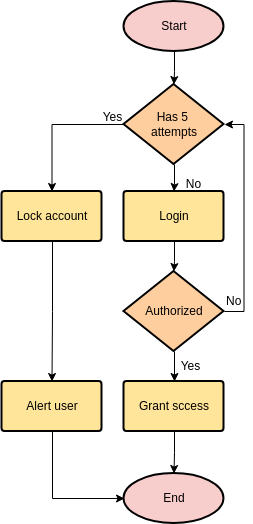
Each symbol means something different in a user flow diagram.
- Ovals represent the start and end of a user flow
- Rectangles represent actions that a user can take or actions that the system will perform
- Rectangles represent decision points within the software
Application Programming Interface (API):
Restful API manage the state of your application. Let's say in your application you are dealing with a set of members. You need a way to bridge your frontend application with your server. We do this through API endpoints. Each endpoint defines the actions to be executed on a given resource. For instance, if you wanted to get a list of all your members the following endpoint has to be defined:
GET /api/v1/membersNow if you wanted to get a member by its ID, you'd create the following endpoint
GET /api/v1/members/{id}To create a member you need to use the POST action and in the body of the request pass the attributes of the member
POST /api/v1/members body
{
   id: "190ecfba-c6af-4639-af92-f94ad16ecb4a"
   name: "John Doe"
   team: "Marketing"
}
To update a member you can use the PUT action
PUT /api/v1/members/{id} The body of the request will be a JSON will all the attributes you want to change.
Now, you can be more explicit with the behavior of the response of the endpoints. For instance, if you wanted to retrieve the members that belong to certain teamId, you can do the following
GET /api/v1/members/teams/{teamId}In a nutshell, endpoints and its corresponding action (GET, POST, PUT, DELETE) represent a change in the state of a resource, such a team, members, etc.
Database Schema:
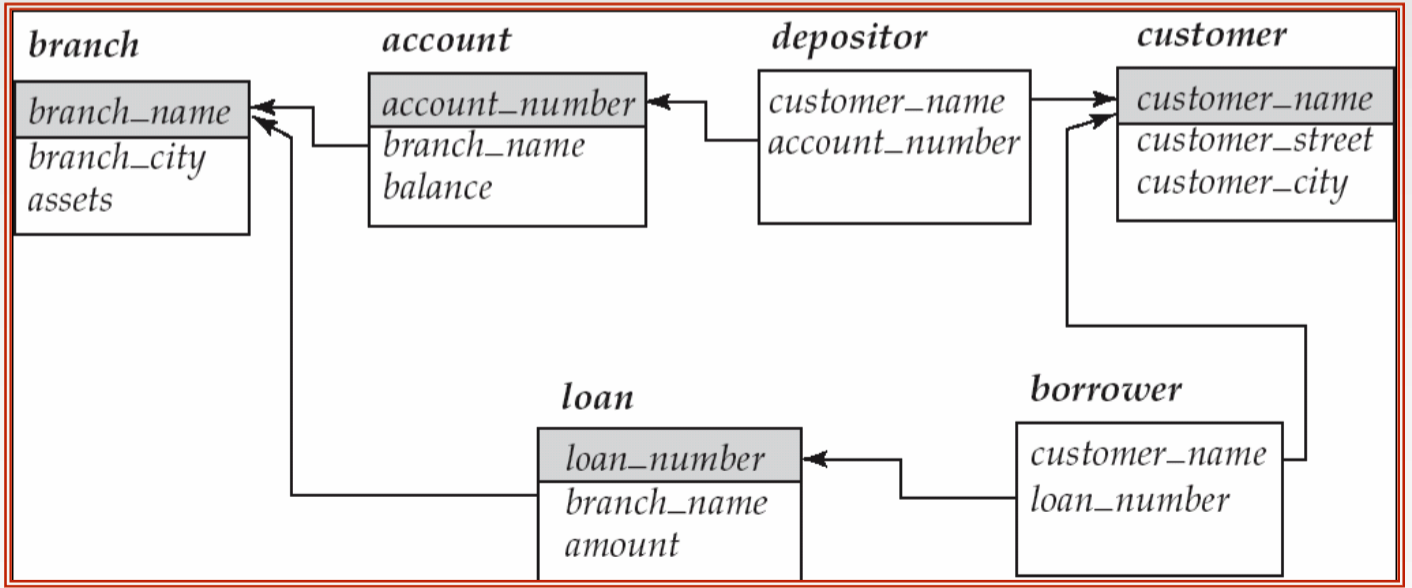
SQL databases let us establish relationships between entities. For instance, a member might be related to a Team, and Team might be related to a list of members. In total, we can define 4 types of relationships: OneToOne, OneToMany, ManyToOne, ManyToMany. The way we declare this relationships is through foreign_keys.
We are looking for a simple Database Schema that defines the relationships between the entities, we do not expect you to write SQL commands or such. For instance, the db schema of the diagram shown above would be the following
1. branch
branch_name (PK)
branch_city
assets

2. account
account_number (PK)
branch_name (FK references branch(branch_name))
balance

3. customer
customer_name (PK)
customer_street
customer_city

4. loan
loan_number (PK)
branch_name (FK references branch(branch_name))
amount

5. depositor
customer_name (PK, FK references customer(customer_name))
account_number (PK, FK references account(account_number))

6. borrower
customer_name (PK, FK references customer(customer_name))
loan_number (PK, FK references loan(loan_number))
Tips
Helpful process to go about designing apps
- What features are most important?
- What information/data you need to build those features?
- How should this information/data be represented, and how much of that information is shown to users?
- What is the flow each user takes in order to access and manipulate this information?
- What would the screens look like to each of the users?
Understanding the end user
- How can we build in a way that creates an app that is accessible, simple to use, and easy to understand?
Good luck! 🙆
Blueprint Games Fall 2026
Your task
Today, you'll work as a Blueprint project team member to plan software for Open Referral. With your team, define the project's goals, deliverables, and features, assuming 14 weeks, or one semester, to build it.
You won't write code today. Your team will discuss the project's needs, choose which features to prioritize, outline user flows, and sketch the data the system needs.
You don't need to understand every technical term before you start. Ask your teammates or E-Board for help, and talk through your ideas together. We're interested in how you collaborate and break down the problem.
Meet the project partner
Open Referral
Project summary
Open Referral partnered with Stevens Blueprint to upgrade the HSDS Transformer, a tool that converts resource directory data into the Human Services Data Specification, or HSDS, format. HSDS provides a shared structure for information about services, including their locations and accessibility, so different systems can exchange that information.
The project's objective was to support HSDS 3.0 and make it easier to convert data from other formats into standardized output. Today, you'll use that project as the basis for your own plan.
The challenge
Different organizations maintain resource directories in separate systems. Those directories often contain overlapping information, but their formats don't match, making it difficult to share data or keep it consistent across systems.
HSDS gives those systems a common format, but adopting it takes work. Someone must understand how their data is organized, map its fields to HSDS, and run the transformation. That process can be especially difficult for people who know the service information well but have limited technical skills or time.
The objective
Plan a process that helps people:
- Map the structure of their source data to HSDS using a documented, repeatable method, initially through a spreadsheet.
- Load their source data and the mapping that describes how to convert it.
- Transform that data into HSDS-compliant output.
- Validate the output and understand any problems that need attention.
Validation checks whether the output follows the standard. Documentation and examples should help someone repeat the process with their own data.
A user-friendly interface for nontechnical users is a stretch goal. Decide what your team can deliver within 14 weeks and which improvements you would leave for later.
Questions to guide your plan
Use these questions to guide your decisions:
- How could the tool reduce the work needed to convert service data into a shared format?
- How could it help people identify and fix problems before sharing the converted data?
- What would make the process understandable for someone without programming experience?
User personas
Consider three types of users with different skills and needs:
Skyler, a data admin. Skyler manages data flows and databases, has advanced data skills, and can use a command-line interface. He wants to retrieve data through an API and run transformations regularly as part of a data pipeline. He needs a repeatable process that fits into existing systems.
Sasha, a professional content manager. Sasha knows the service information and can organize data and create a mapping in a spreadsheet. She has intermediate data skills but is unfamiliar with GitHub, Python, and command-line tools. She wants a web interface that lets her transform data without installing several programs or learning to use them.
Sheila, a volunteer or part-time content manager. Sheila knows the service information but has basic data skills and limited training in data management. She needs guidance to map her data to HSDS, load it, and run the transformation. The process should let her use her knowledge of the services without requiring software development skills.
Decide which personas your proposed tool will support first and explain how their needs affect your choices.
Getting started
When Blueprint works with a project partner, the partner describes the challenge, and the team works out how to address it. Today, you'll make those decisions. Start with the summary, challenge, objective, and user personas above.
Your team can choose its approach, but be ready to explain your reasoning. Different solutions have different tradeoffs. Plan for a project your team can complete in 14 weeks.
Discuss questions such as:
- Would a website, command-line tool, API, or a combination best meet these needs?
- What do you need to know about each user? Consider their comfort with technology, the data they work with, and accessibility needs.
- How would someone supply data, define a mapping, review problems, and retrieve the result?
- Does your approach need accounts or saved work? If so, what should each person be able to view or change?
- Which features would be most useful to Open Referral and the people using the Transformer?
- What can you reuse from the existing Transformer, and what needs to change?
- What can your team realistically build, test, and prepare for use within 14 weeks?
- What belongs in the first version, and what would you leave for later?
When you're ready, make a copy of the team design document template and share it with your teammates. The template includes tips for taking notes.
Deliverables
Your team will submit its design document at the end of the exercise. You won't give a presentation.
Keep your notes as you work. Include ideas you considered, questions you couldn't answer, and reasons for your decisions. Rough sketches and unfinished work are welcome. We care more about your process than polished formatting.
Your document can include:
- User stories that describe what someone needs to do and why.
- A list of key features and their priorities.
- User flow diagrams that show how someone completes a task.
- Wireframes that sketch the main screens.
- A data model that identifies the information the tool processes and how it connects. If your design needs a database, include its schema; if it doesn't, explain how the tool handles data without one.
- API endpoints that describe how the application could request or change data.
If you create diagrams or wireframes in another tool, include screenshots in your document.
These are examples of useful artifacts, not a requirement to finish every item. Submit what your team develops, including work in progress.
Submission Link
Appendix
Use these explanations if your team needs help getting started.
User flow diagrams
A user flow diagram shows the steps someone takes to complete a task and how the system responds. For example, a login flow might show someone entering their credentials, the system checking them, and the person either reaching their account or receiving an error.
You may need separate diagrams for different tasks or account types.
Common symbols include:
- Ovals for the start and end of a flow.
- Rectangles for actions taken by a person or the system.
- Diamonds for decisions, with labeled branches such as "Yes" and "No."
- Arrows to show the order of steps.
Application programming interfaces
An application programming interface, or API, lets software communicate with other software. In a web application, the frontend can use API endpoints to request data from the server or ask it to make changes.
An endpoint combines an address with an HTTP method that describes the operation.
For example, an application that manages members might use:
Method and endpoint | Purpose |
|---|---|
| Retrieve a list of members. |
| Retrieve one member by ID. |
| Create a member. |
| Replace a member's editable information. |
| Update selected fields for a member. |
| Delete a member. |
The {id} placeholder represents the ID of a particular member.
To create a member, the frontend could send a POST request with a JSON body:
POST /api/v1/members{
"name": "John Doe",
"teamId": "team-123"
}The server could assign the new member an ID when it saves the record.
To change only the member's team, the frontend could send:
PATCH /api/v1/members/{id}{
"teamId": "team-456"
}To retrieve members of a particular team, the application could use:
GET /api/v1/teams/{teamId}/membersGET requests read data. Methods such as POST, PUT, PATCH, and DELETE request changes.
For this exercise, you only need to describe the endpoints your system might need and what they do. You don't need to implement them.
Database schemas
A database schema describes the information a system stores and the relationships between records.
For example, an application might store teams and members. If each member belongs to one team, the schema could look like this:
Team
- id: primary key
- name

Member
- id: primary key
- name
- team_id: foreign key referencing Team.id
A primary key uniquely identifies a record. A foreign key references a record in another table.
In this example, one team can have many members, and each member belongs to one team. That's a one-to-many relationship when viewed from the team, and a many-to-one relationship when viewed from a member.
Other relationships include:
- One-to-one: Each record relates to at most one record on the other side.
- Many-to-many: Records on both sides can relate to multiple records. For example, a service can be available at multiple locations, and a location can offer multiple services.
In a relational database, a many-to-many relationship usually uses a connecting table. A table called ServiceLocation, for example, could connect a service ID to a location ID.
For this exercise, list the records, fields, and relationships your system needs. A diagram or a plain-text outline is enough. You don't need to write SQL, and your team can decide whether the Transformer needs a database or can process files without storing them.
Tips
A process to try
- Identify the most important tasks each type of user needs to complete.
- Choose the features that support those tasks.
- List the information those features need.
- Decide how to organize that information, whether to store it, and who can view or change it.
- Map the steps someone takes to complete each task.
- Sketch the screens that support those steps.
- Check whether your plan fits within 14 weeks, and adjust the scope if needed.
Keep the users in mind
As you make decisions, consider:
- Can someone understand what to do without training?
- Will the system work on the devices they have?
- Can people with different accessibility needs use it?
- If your design includes accounts, does each account have access only to the information it needs?
Talk through disagreements, record your assumptions, and ask for help when you get stuck. Your notes should show how your team reached its decisions.