Week 4
What is an ORM?
Last week, we covered SQL and PostgreSQL. However, in many applications, developers don't want to write raw SQL for any usage of the database. An ORM, Object Relation Mapper, helps bridge objects and database tables by representing tables as classes and rows as objects.
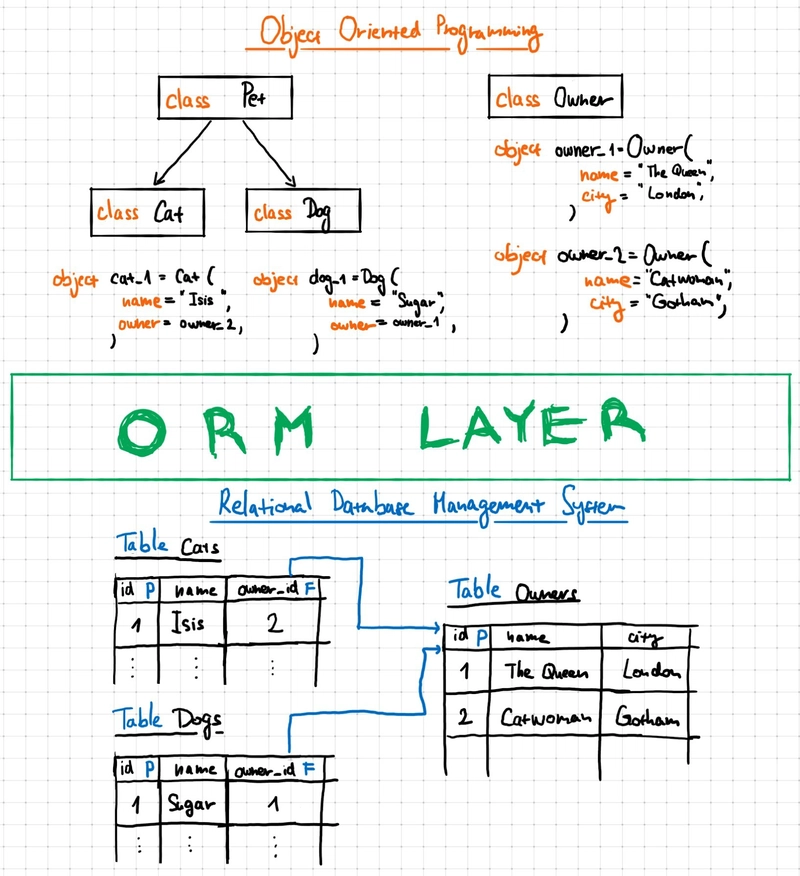
Why an ORM?
An ORM gives us a code friendly way of working with data in tables with rows, columns, primary keys, and foreign keys. This is helpful because most backend applications aren't written in SQL, but it allows us to use whatever language we want, Python or Typescript, for example, while being able to use Postgres as the database.
What is SQLAlchemy?
SQLAlchemy is a Python ORM that we can import as a library. This lets us describe our database tables as a Python class and its columns as class attributes.
Models
In SQLAlchemy, a model is a Python class that represents a database table. Each model class has a __tablename__ value and attributes that define columns, such as id, name, or email
from sqlalchemy import Column, Integer, String
from sqlalchemy.orm import declarative_base

Base = declarative_base()

class Resource(Base):
    __tablename__ = "resources"

    id = Column(Integer, primary_key=True)
    name = Column(String, nullable=False)
    category = Column(String, nullable=False)
    address = Column(String)
    contact_email = Column(String)
In this example, the Resource class maps to a table named resources, and each class attribute maps to one column in that table.
Columns and Data Types
Just like in PostgreSQL, each column in a SQLAlchemy model has a type (Integer, String, etc). You can also add constraints in the model definition. For example, primary_key=True marks a column as the primary key, and nullable=False means that the column is required and should not be left empty.
Primary Keys and Foreign Keys
A primary key identifies a row in a table, and a foreign key references the primary key of another table, which we learned last week. Here is what that looks like in SQLAlchemy
from sqlalchemy import Column, Integer, String, ForeignKey, Date
from sqlalchemy.orm import declarative_base

Base = declarative_base()

class Referral(Base):
    __tablename__ = "referrals"

    id = Column(Integer, primary_key=True)
    family_name = Column(String, nullable=False)
    resource_id = Column(Integer, ForeignKey("resources.id"))
    referral_date = Column(Date)
    notes = Column(String)
Here, resource_id is a foreign key that points to resources.id. That means that each referral can be linked to an existing resource, like we setup last week.
Relationships
Foreign keys connect tables at the database level, but SQLAlchemy can also define relationships at the Python level. Relationships make it easier to move between related objects in code, such as going from a resource to all of its referrals
from sqlalchemy.orm import relationship

class Resource(Base):
    __tablename__ = "resources"

    id = Column(Integer, primary_key=True)
    name = Column(String, nullable=False)

    referrals = relationship("Referral", back_populates="resource")

class Referral(Base):
    __tablename__ = "referrals"

    id = Column(Integer, primary_key=True)
    resource_id = Column(Integer, ForeignKey("resources.id"))

    resource = relationship("Resource", back_populates="referrals")
Connecting to PostgreSQL
Before SQLAlchemy can do anything, we need to connect it to our database.
from sqlalchemy import create_engine

# If you are using a hosting provider, they will give you this
engine = create_engine("postgresql://user:password@localhost/dbname")
Sessions
After SQLAlchemy knows how to connect to PostgreSQL, it needs a way to actually interact with the database. That is the role of a session.
A session is the object that manages database operations like adding rows, querying data, and saving changes. You can think of it as your temporary conversation with the database while your Python code is running.
from datetime import date
from sqlalchemy.orm import Session

with Session(engine) as session:
    food_bank = Resource(
        name="City Food Bank",
        category="Food",
        address="123 Main St",
        contact_email="help@cityfoodbank.org",
    )

    tutoring_program = Resource(
        name="Bright Futures Tutoring",
        category="Education",
        address="45 College Ave",
        contact_email="info@brightfutures.org",
    )

    session.add_all([food_bank, tutoring_program])
    session.commit()

    referral_1 = Referral(
        family_name="name1",
        resource_id=food_bank.id,
        referral_date=date(2026, 4, 1),
        notes="note1",
    )

    referral_2 = Referral(
        family_name="name2",
        resource_id=tutoring_program.id,
        referral_date=date(2026, 4, 2),
        notes="note2",
    )

    session.add_all([referral_1, referral_2])
    session.commit()
In this example, we create the session using with Session(engine) as session:. Inside that, we create Resource and Referral objects in Python, add them to the session, and save them to PostgreSQL with Session.commit()
Creating Tables
After you define your models, SQLAlchemy can use the models you defined to create the tables in the database, using Base.metadata.create_all(engine). This is an example of why using an ORM is better. Instead of writing raw SQL, SQLAlchemy uses your Python models to create the matching tables
from sqlalchemy import Column, Integer, String, ForeignKey, Date, create_engine
from sqlalchemy.orm import declarative_base, relationship

Base = declarative_base()

class Resource(Base):
    __tablename__ = "resources"

    id = Column(Integer, primary_key=True)
    name = Column(String, nullable=False)
    category = Column(String, nullable=False)
    address = Column(String)
    contact_email = Column(String)

    referrals = relationship("Referral", back_populates="resource")

class Referral(Base):
    __tablename__ = "referrals"

    id = Column(Integer, primary_key=True)
    family_name = Column(String, nullable=False)
    resource_id = Column(Integer, ForeignKey("resources.id"))
    referral_date = Column(Date)
    notes = Column(String)

    resource = relationship("Resource", back_populates="referrals")

engine = create_engine("postgresql://postgres:postgres@localhost:5432/communitybridge")

Base.metadata.create_all(engine)
Querying Data
One of the main reasons to use an ORM is to query data using Python. SQLAlchemy sessions can retrieve all rows, filter rows, and follow relationships between models. For example
with Session(engine) as session:
    all_resources = session.query(Resource).all()
    food_resources = session.query(Resource).filter(Resource.category == "Food").all()
The first line gets every row in the resources table, and the second line gets only rows where the category is "Food". SQLAlchemy turns those Python expressions into SQL queries behind the scenes.
You can also create and save new rows:
new_resource = Resource(
    name="City Food Bank",
    category="Food",
    address="123 Main St",
    contact_email="help@cityfoodbank.org"
)

session.add(new_resource)
session.commit()
Here, we create a Python object, add it to the session, and commit the change so it is saved to PostgreSQL
Getting Started
Join the GitHub Classroom assignment with the following link: https://classroom.github.com/a/XIyvm9h_
Once you join, your repository will be created https://github.com/blueprint-learn/week4-techteam-sp26-{github-username}
Once you join, GitHub Classroom will automatically create your personal repository. You will receive an email confirming access.
After receiving access:
-
Clone your repository locally
-
Install dependencies
-
Run the starter FastAPI app
This repository contains the scaffolding you will extend during this week.
git clone https://github.com/blueprint-learn/week4-techteam-sp26-{github-username}.git