Transition Document - VP Finance
Overview
The VP of Finance (AKA "Treasurer") is responsible for all of Blueprint's financial matters. This includes budgeting, handling payments, managing receipts, and coordinating merchandise orders. In the future, this role would also be responsible for managing sponsor donations. Attached to this document is Addendum E - Finance Policy as of Spring_2024.pdf. While Undergraduate Student Life provides training to treasurers every semester, you should still READ THE ENTIRE DOCUMENT. There is also another shelf in the Wiki regarding Blueprint specific expenses that you should read as well.
- Purpose of the role: Monitor the budget, track spending
- Key collaborators: Marissa Carroll (Student Life Administrative Assistant), President
- Top advice: NEVER overspend, have an itemized proper receipt
Responsibilities
Drafting a Budget for the Big Budget Meeting (BBM)
Every semester the SGA Budgeting Committee holds a meeting to decide funding for the following semester. They will email you the timelines, however, you must prepare and submit a budget by a certain deadline. Otherwise, you will have to request each individual expense the following semester via AFRs.
There are example budget from past semesters in the Google Drive. Your budget must be itemized and should include:
- Events - food/drink, supplies, prizes (if necessary)
- Operational Expenses - AWS, Canva Pro, etc
- Promotional Materials - Merchandise, Stickers, Banners, etc
Once you draft the budget, you should present it to the Executive Board for review. Someone from the Executive Board must present the budget at the BBM. As VP Finance it is your responsibility to find someone to attend and present if you cannot be there yourself.
Additional Funding Requests (AFR), Reallocations, and Rollovers
If we need more money for events, or if there was an expense that wasn't budgeted for in the BBM, you can submit an Additional Funding Request (AFR) through Ducklink.
To change how funds are used you would submit a Reallocation Request through Duckliink. Here are some examples of when you might do a realloaction:
- Changing the specific food/drink or vendors used at an event
- Changing event formats entirely
AFRs and Reallocations must be itemized spreadsheets (examples in the Google Drive). You can submit these requests anytime throughout the semester, but try to do them at least 2 weeks in advance of when we need the funds. Typically these requests are due Wednesday night at 11:59 P.M and than you must explain the changes to the SGA Budgeting Committee during one of their Sunday meetings, so the process takes about a week.
There is also another type of request called Rollovers, where unused funds can be pushed to the next semester. NO Spring to Fall Rollovers - use all funding in the Spring Semester. An example expense that might get rolled over is AWS Credits.
Payments & Receipts
All Payments and Receipts are uploaded through the Money --> Budgeting page on Ducklink.
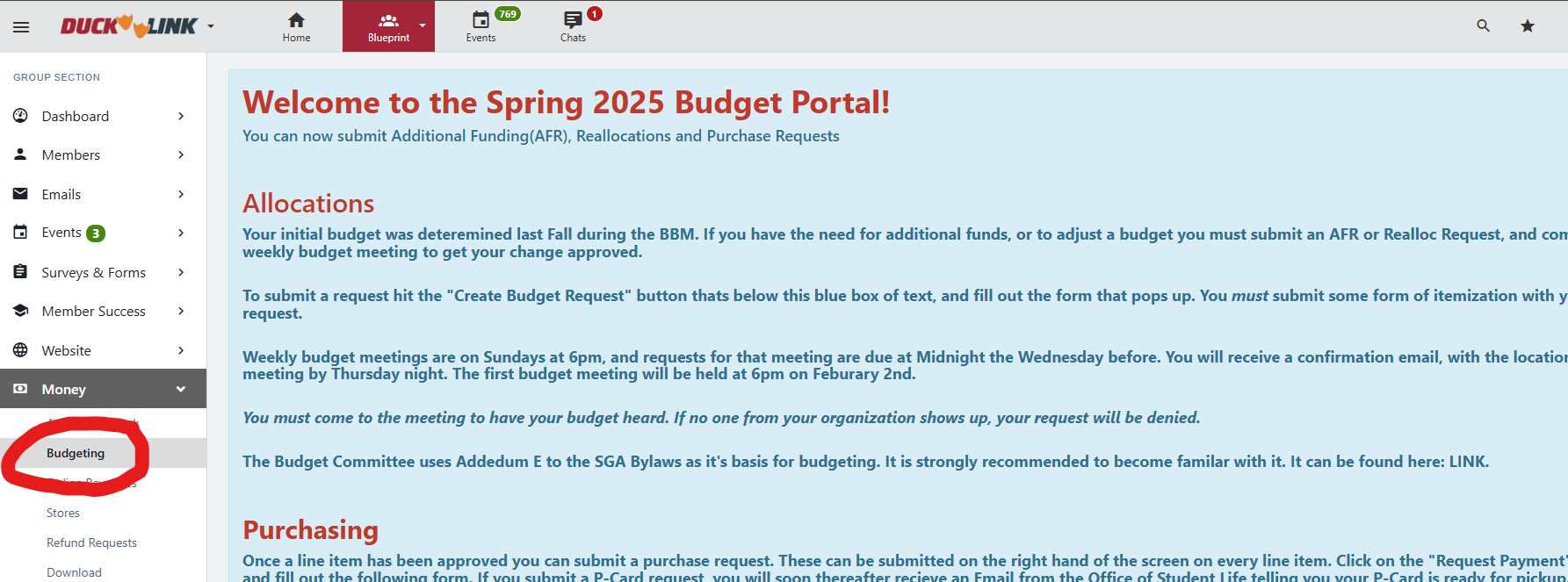
There are 2 main methods to make payments: P-Card and Invoices. You will receive training from Student Life on how to do both, but for this guide, I will leave brief instructions for P-Card purchases since that is the method we use the most. P-Cards are Credit Cards that we can pick up in person to make payments or add to accounts like Canva Pro and AWS.
Steps
- Click "Request Payment" on the specific expense in question

- Fill in the details as needed (note - you must fill this information out in order to pick up the P-Card. Once the payment is made, when you return to this form to upload receipts change the "From Allocated" category to the actual amount spent)

- Enter P-Card for type of payment request

- Enter the remaining details on the form. Note: Select SGA Funding and use the account number 1201669

- After the form is submitted you will be able to pick up the P-Card for purchases. Do this at least 2-3 days in advance! Once you make your payments, you will have to upload receipts in this same form. However, to access it you click the payment request ID in Ducklink


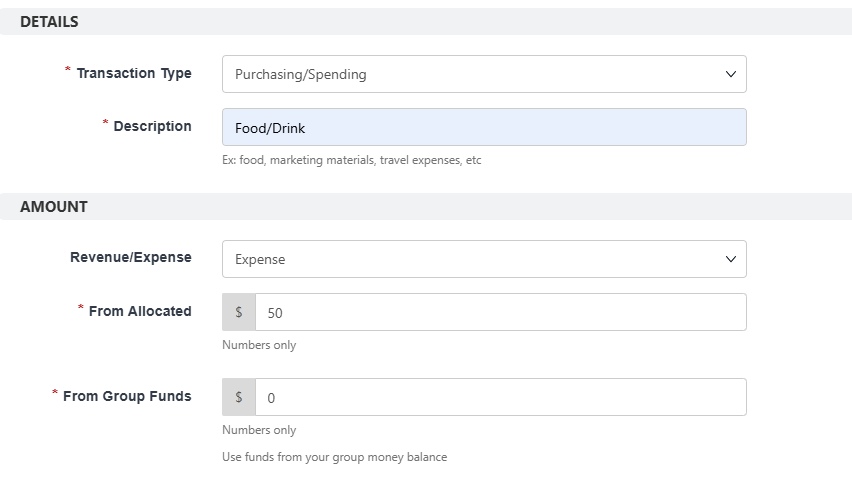
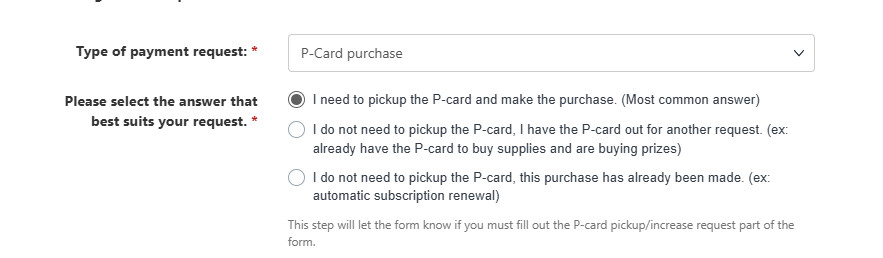
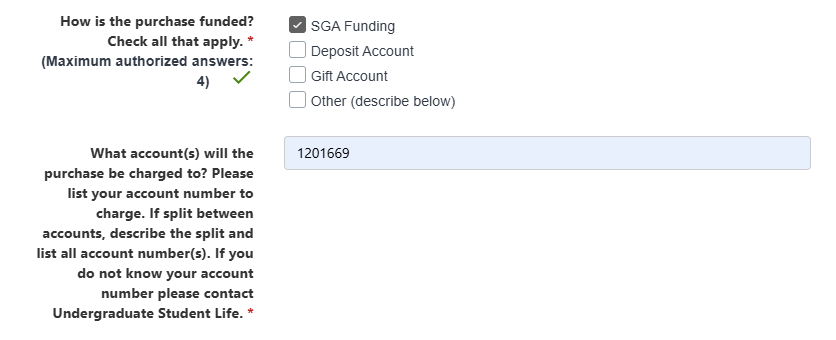

Notes:
- Stay as true to the budget as possible. You don't have to buy the exact same brand/item that was listed, but you should if possible. Failure to do so could result in sanctions for Blueprint
- Itemized receipts! Take a picture of the receipt as soon as you get it. Also retain the paper copy just in case. Student Life is very particular on receipts, and if they are missing information than our organization can face sanctions. All receipts should include:
- Date of Purchase
- Place of Purchase (name/logo of vendor)
- Vendor Address (if purchased in person)
- Itemization of what was purchase, must clearly list what you bought and unit cost
- Total cost
- Last 4 digits of card used
- Must be clear pictures, must be in English and should not be handwritten
Merchandise Orders
If there are any orders for Merchandise you will be responsible for collecting payments and sending out the order forms. If we have budget for merch than you can do it through Ducklink. If you students are paying out of pocket, I typically create a Google Form and a Venmo to handle all of the ordering.
Gift Account
We currently have a temporary gift account. We are in the process of opening our permanent account. We currently use the miscellaneous gift account GF3100006, Gifts for Miscellaneous Student Groups. To make a donation, donors must go to https://www.givecampus.com/campaigns/68402/donations/new?amt=100.00 and select the fund “Student Activities”. Once a donor makes a contribution, you must notify Marissa of the donor's name so that Marissa can set it aside for us. You don't need to get SGA approval to spend the gift account fund.
Update the Budgeting Dashboard
Update the Budgeting Dashboard to ensure all e-board members have clear visibility into operational spending and costs, with regularly refreshed metrics that improve transparency and support informed decision-making.
Future Goals
Operational Tools Expansion
Engaging with the project teams and the VP of Engineering to identify and acquire additional operational tools.
- Current Status: I’ve been gathering input from members on tools they’d find useful. For example, VP Design requested Flaticon, and VP Recruitment expressed interest in Clay.
- Next Steps: Create and distribute a Google Form to project teams and internal members to collect requests for additional operational tools, including their intended use and estimated cost.
- Why It Matters: A significant portion of Blueprint’s budget goes toward operational costs, and since the organization is built on technology, having the right tools in place is essential for efficiency and impact.
How You Can Succeed in This Role
- The most important part is managing a good relationship with SGA.
- Have the correct receipts, and make sure it is itemized and is separate for different categories
- Plan in advance. make sure you request the pcard 3-4 business days in advance.
- always ask question when you are unsure, especially to marissa.
- follow the SGA rules
Summer / Off-season Tasks
List tasks that should be completed before the new term begins, with owners.
| Task | Owner (Role) | Target Date |
|---|---|---|
| Crafting Fall Semester Budget | VP Finance | April (GA will notify exact date) |
| Crafting Spring Semester Budget | VP Finance | December (SGA will notify the exact date) |
| Budget Dashboard | VP Finance | Beginning of Fall |
Key Resources
Key contacts:
| Name | Role/Organization | Context |
|---|---|---|
| Marissa Carroll | Student Life Administrative Assistant | Located: Duck Link (mcarroll1@stevens.edu). |
Key resources:
| Name | Source |
|---|---|
| Finance Policy | Addendum E - Finance Policy as of Spring_2024.pdf. |
| Budget Dashboard | Example of Spring 2026 Budget Dashboard |
| Budget Template | Budget Template |