
Blueprint Games Fall 2026
Your Task
Today, you will assume the role of a Blueprint project team member. You and your team will work together to define project goals, deliverables, and features for a nonprofit, assuming you have ten weeks to implement your plan.
Don't worry — you won’t be writing any code today. Instead, your team will focus on understanding and discussing product needs, outlining key features, planning high-level user flows, and modeling your initial database needs.
✨ If you don't understand every part of the prompt, that's okay. Ask your team members (and E-Board) for help! This exercise is as much about your ability to collaborate as it is about your ability to work towards completing a technical task.
🥁 Drumroll… Introducing the nonprofit you’ll be working with today…
Go Project NYC
The GO Project helps New York City public school students thrive in the earliest stages of their education through year-round academic, social-emotional, and family support.
New York City is the largest public school system in the country – and nearly half of all students are behind grade level in reading or math. Many NYC public schools and families with limited resources do not have the opportunity to provide individualized support to every student who needs it. And when students fall behind academically, their learning gaps grow wider over time, making it increasingly difficult to catch up without intervention.
As Go Project grows, executives have found it difficult to organize and track student and teacher progress. To address this issue, they have decided to contract you to create a custom GO Project NYC software. Their requests are:
- Student, Teacher, and Admin accounts with appropriate permissions.
- Ability to track student attendance, grades, academic progress, as well as social-behavioral skill development.
- Schedule creator with assigned classrooms, students, and teachers
The Goal
✨ When creating your software, consider the following questions:
-
How can we leverage technology to alleviate the need for manual tracking and scheduling?
-
How can we leverage technology to ensure student success within the program?
The Users
- Go Project NYC Admins organizing events
- Teachers/Volunteers teaching classes
- Students participating in classes
Getting started
When Blueprint partners with a nonprofit, they describe the challenge they’re facing, and we’re free to decide how to tackle it. Today, you’re in Blueprint’s place. How you choose to approach this prompt is entirely up to you and your team. Just make sure you can provide solid justifications for your decisions. There’s no right answer—everything has tradeoffs. For this project you can assume that you have 14 weeks (1 semester to complete it).
Here are some questions to get you started.
- What kind of system do you think would fit best? Is it an app, a website? Or is it something else entirely?
- Consider the profile of a typical user. Are there any considerations that should be made when designing a new system for said user? How might these considerations affect the final deliverable?
- What features would be most valuable to the nonprofit and its end-users?
- How can you make sure it's feasible for your team to complete within the ten weeks?
- What should you focus on? What might you have to sacrifice?
When you’re ready to get started, duplicate this Google Doc and share it with your team members. The doc contains a few tips on how to take notes.
Deliverables
🌟 You will not be asked to present your final deliverables. We are more interested in seeing how you go about understanding and breaking down the problem than any polished final result.
Document any thoughts, drawings, or features as you work! At the end, you will submit everything your team has come up with.
That said, we aren't looking to see a beautiful polished design doc — we're most interested in your process, so feel free to include in-progress work and notes, and don't fret about the formatting.
Your team will submit the design doc (created earlier) which can include any artifacts you create or use throughout this process. This can include:
- User Stories
- A List of Key Features
- User Flow Diagrams - include screenshots if you make them in a separate software
- Wireframes - include screenshots if you make them in a separate software
- Database Schema - this should include the data you think is neccessary for the system to run
- Application Programming Interface (API) Endpoints
Appendix
User Flow Diagram: A visual diagram that describes the steps a software system takes when a user performs performs certain actions. There can be multiple user flows, which might call for multiple diagrams or variations of diagrams. For example, say your website requires users to create an account and login. A user flow diagram for the login process would look something like this:
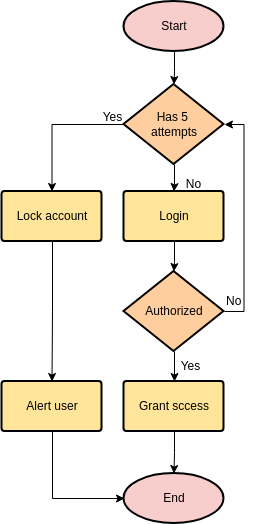
Each symbol means something different in a user flow diagram.
- Ovals represent the start and end of a user flow
- Rectangles represent actions that a user can take or actions that the system will perform
- Rectangles represent decision points within the software
Application Programming Interface (API):
Restful API manage the state of your application. Let's say in your application you are dealing with a set of members. You need a way to bridge your frontend application with your server. We do this through API endpoints. Each endpoint defines the actions to be executed on a given resource. For instance, if you wanted to get a list of all your members the following endpoint has to be defined:
GET /api/v1/membersNow if you wanted to get a member by its ID, you'd create the following endpoint
GET /api/v1/members/{id}To create a member you need to use the POST action and in the body of the request pass the attributes of the member
POST /api/v1/members body
{
   id: "190ecfba-c6af-4639-af92-f94ad16ecb4a"
   name: "John Doe"
   team: "Marketing"
}
To update a member you can use the PUT action
PUT /api/v1/members/{id} The body of the request will be a JSON will all the attributes you want to change.
Now, you can be more explicit with the behavior of the response of the endpoints. For instance, if you wanted to retrieve the members that belong to certain teamId, you can do the following
GET /api/v1/members/teams/{teamId}In a nutshell, endpoints and its corresponding action (GET, POST, PUT, DELETE) represent a change in the state of a resource, such a team, members, etc.
Database Schema:
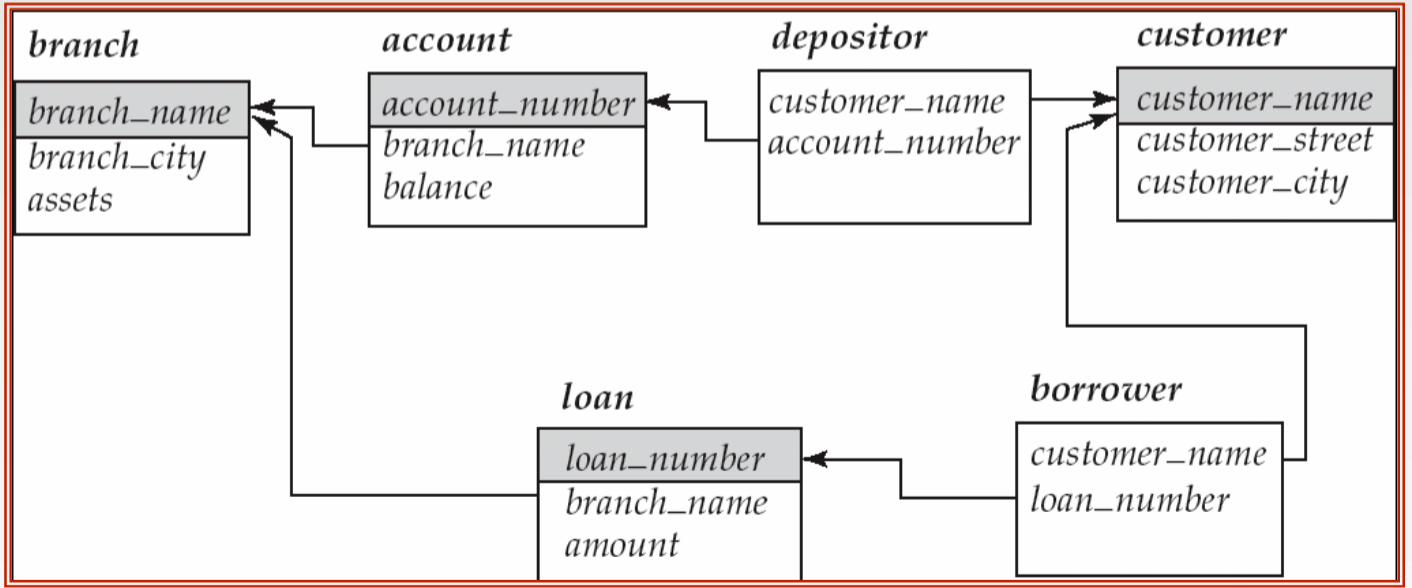
SQL databases let us establish relationships between entities. For instance, a member might be related to a Team, and Team might be related to a list of members. In total, we can define 4 types of relationships: OneToOne, OneToMany, ManyToOne, ManyToMany. The way we declare this relationships is through foreign_keys.
We are looking for a simple Database Schema that defines the relationships between the entities, we do not expect you to write SQL commands or such. For instance, the db schema of the diagram shown above would be the following
1. branch
branch_name (PK)
branch_city
assets

2. account
account_number (PK)
branch_name (FK references branch(branch_name))
balance

3. customer
customer_name (PK)
customer_street
customer_city

4. loan
loan_number (PK)
branch_name (FK references branch(branch_name))
amount

5. depositor
customer_name (PK, FK references customer(customer_name))
account_number (PK, FK references account(account_number))

6. borrower
customer_name (PK, FK references customer(customer_name))
loan_number (PK, FK references loan(loan_number))
Tips
Helpful process to go about designing apps
- What features are most important?
- What information/data you need to build those features?
- How should this information/data be represented, and how much of that information is shown to users?
- What is the flow each user takes in order to access and manipulate this information?
- What would the screens look like to each of the users?
Understanding the end user
- How can we build in a way that creates an app that is accessible, simple to use, and easy to understand?
No comments to display
No comments to display