
Week 6
Week 6
Last week, our list of interests lived in a JavaScript file that we imported. The page already had the data when it started. A merch site can't work thatlike way.that. It needshas to ask another service for the current products, and later tell that serviceit what goes in the cart.
ThisThat's week is aboutwhat REST APIs,APIs are for. By the mostend, commonyour waypage websiteswill askload aits servercards for data or ask it to change something. We'll learn the vocabulary first: resources, endpoints, methods, status codes, JSON bodies, and headers. Then we'll makewith a real GET request from React, watch it in the browser's Network tab, andrequest, handle an empty list and a failure.failure, Atand theyou'll end,know we'llhow to read Fourthwall's API docs, which is the API our merch site will use.
For the hands-on part, we'We'll request a small JSON file from our own developmentdev server.server, Everyoneso getsnobody the same example withoutneeds a shop account or an APIa token. The file is made-up class data, not a live product catalog, but the request is a real HTTP GET.
Getting started
The complete practice files are included at the end of this lesson.
Save and commit your Week 5 work. Open a terminal at the top of practice-page and create a branch from that saved work:
git status
git switch -c load-interests
Copy the supplied Week 6 App.jsx and App.css into react-page/src. Copy interests.json into react-page/public. Keep the existing main.jsx, styles.css and last week's InterestCard.jsx. The new App.jsx still uses InterestCard for each card.
This reference includes a finished request function. For the exercise, find async function loadInterests() in your copy of App.jsx. Replace that entire function with this empty one, leaving the rest of App in place:
function loadInterests() {
}
We'll build the function together. The supplied file keeps the familiar InterestCard ready so we can spend this meeting on requests.
Start the server from react-page:
cd react-page
npm run dev
Open the address printed by the terminal. The page should show Load interests and a message asking you to click. The button willwon't do nothinganything until we write its function. If npm isn't found, check the Setup page.
What an API is
The frontend is thewhat part of an application runningruns in the browser: the page, the buttons, and our React code we have been writing.code. A server is a program that receivesgets requests and sends back responses. Our Vite developmentdev server is one example.one. A shop's backend is another. It can look up stored products and update a cart.
An API,API short for (application programming interface,interface) is the set of requests a piece of softwareserver agrees to answer. AIts webdocs API'stell documentationyou tellswhat us which requests weyou can send and what we'you'll get back. WeYou don'tnever see the server's code or database.database, We only seejust the requests it accepts.
HTTP is the set of rules browsers and servers use to send those messages.talk. Every exchange is one request from the client and one response from the server.
What REST means
REST is a common style for designing web APIs. ItIt's isn'tnot a library or a filesomething you install. It's a set of habits that make APIs predictable:
- The API is organized around resources, the things it has data about.
- Each resource has its own URL.
- The HTTP method says what you want to do with that resource.
- The status code says how it went.
- Each request carries everything the server needs to answer it.
Once you know thesethese, habits,most a new REST API'sAPI docs start to look familiar.
Resources and endpoints
A resource is a noun: a product, a collection of products,collection, a cart. A REST API gives each one an address. For a shop it might look like this:
| URL path | Resource |
|---|---|
/products |
All products |
/products/blueprint-shirt |
One product, picked out by its slug |
/carts/abc123 |
One cart, picked out by its ID |
ThePaths path is made ofare nouns, not verbs. You won't usually see /getProducts. The verb comes from the method instead.method.
An endpoint is one method plus one pathpath, that the API supports, such aslike GET /products. API docs are mostly a list of endpoints.
Query parameters come after ? in a URL. They are named values, separated by &, like ?page=0&size=50. They adjusttweak athe request, for example by choosinglike which page of results you want. They don't change which resource you're talkingasking about.
In our exercise, the resource is the class interest list, and its URL is /interests.json.
HTTP methods
The method is the action. These five come up most:
| Method | What it asks for | Shop example | Example path |
|---|---|---|---|
GET |
Read a resource. Changes nothing. | Get the product list. | /products |
POST |
Create something new, or run an action. | Create a new cart. | /carts |
PUT |
Replace a whole resource with the one you send. | Replace a saved address. | /addresses/{addressId} |
PATCH |
Change only some fields of a resource. | Change just the quantity of one item. | /carts/{cartId}/items/{itemId} |
DELETE |
Remove a resource. | Remove one item from a cart. | /carts/{cartId}/items/{itemId} |
These paths show a typical shop API, not a real one. Check the real docs before using any path.
GET is safe to repeat:repeat. askingAsking for the product list twice doesn'tchanges change anything.nothing. POST usually isn't. SendingSend the same "add to cart" request twice canand addyou might get two shirts.shirts, Keepso thatwatch differenceout infor minddouble when a button gets clicked twice.clicks.
These are the usual meanings, but the API's docs have the final say. Some APIs use POST forwhere actionsothers that another API would do withuse PATCH or DELETE. We'Fourthwall does this, as we'll see an example with Fourthwall below. We can't swap GET for POST and expect the server to guess what we meant.
Today we only send GET., Writing data needs a server that stores it, andsince our JSON file is just a file.file and can't store anything. We'll send real POST requests when we connecthook the project toup Fourthwall.
Status codes
Every response starts with a three-digit status code. The first digit tells you the group:
| Group | Meaning | Codes you'll see |
|---|---|---|
2xx |
It worked. | 200 OK, 201 Created, 204 No Content |
4xx |
Something is wrong with the request. Check what you sent. | 400 Bad Request, 401 Unauthorized, 403 Forbidden, 404 Not Found, 409 Conflict, 429 Too Many Requests |
5xx |
The server had a problem. Your request might be fine. | 500 Internal Server Error, 503 Service Unavailable |
A quickQuick rule: 4xx means look atcheck your code,code. 5xx means look atit's the serverserver, (orso wait and retry).retry.
Request and response bodies
The body is the data a message carries. A GET request usually has nonone, body, becausesince the URL already says what we want. The response body holds the datawhat we asked for.
A POST, PUT, orand PATCH requestrequests usually hashave a body describingsaying what to create or change. Most REST APIs send bodies asuse JSON in both directions.ways.
Reading JSON
Open public/interests.json. The start should look familiar:
[
  {
    "id": "games",
    "title": "Video games",
    "description": "I like learning how games are designed."
  }
]
JSON,JSON short for (JavaScript Object Notation,Notation) is a text format for sending data. ThisIt's examplethe is ansame array containingof anobjects object.as Unlikelast ourweek's .interests.jsfile,minus it has nothe export,. variable declaration, or function. Property namesNames and strings useneed double quotes.quotes, and JSON does notdoesn't allow comments or ana extratrailing comma after the last item.comma.
Open /interests.json at the same local address as your app.app's Foraddress, example, if your page is at http://localhost:5173, openlike http://localhost:5173/interests.json. TheYour browser just madesent a GET request for that resource and is showing you the response body. TheNote public folder name is notisn't part of the URL.
TheThat text arriving over HTTP still has to be turned intobecome JavaScript data before React can use it. That isThat's what response.json() will do.does.
Headers and statelessness
Headers are namedextra pieces of informationinfo about a message, separate from the body. A few common ones:
| Header | What it says |
|---|---|
Content-Type: application/json |
The body is JSON. Sent on responses, and on requests that have a JSON body. |
Accept: application/json |
The client would like JSON back. |
Authorization |
Proof of who is asking, such as a token. Not every API uses this header. Some put the token in the URL instead. |
REST APIs are stateless. The server doesn't remember your earlier requests.requests, Eachso requesteach one has to includecarry everything needed to answer it: theeverything: method, the URL, any token, and any body. That's why a cart API asks forwants the cart ID inon every cart request. The server isn't keeping track of "your" cart between messages. You tell it which one,cart, every time.
Stateless hereThis is about the server. It's differentnot fromthe same as React state, which is the page remembering values between renders.
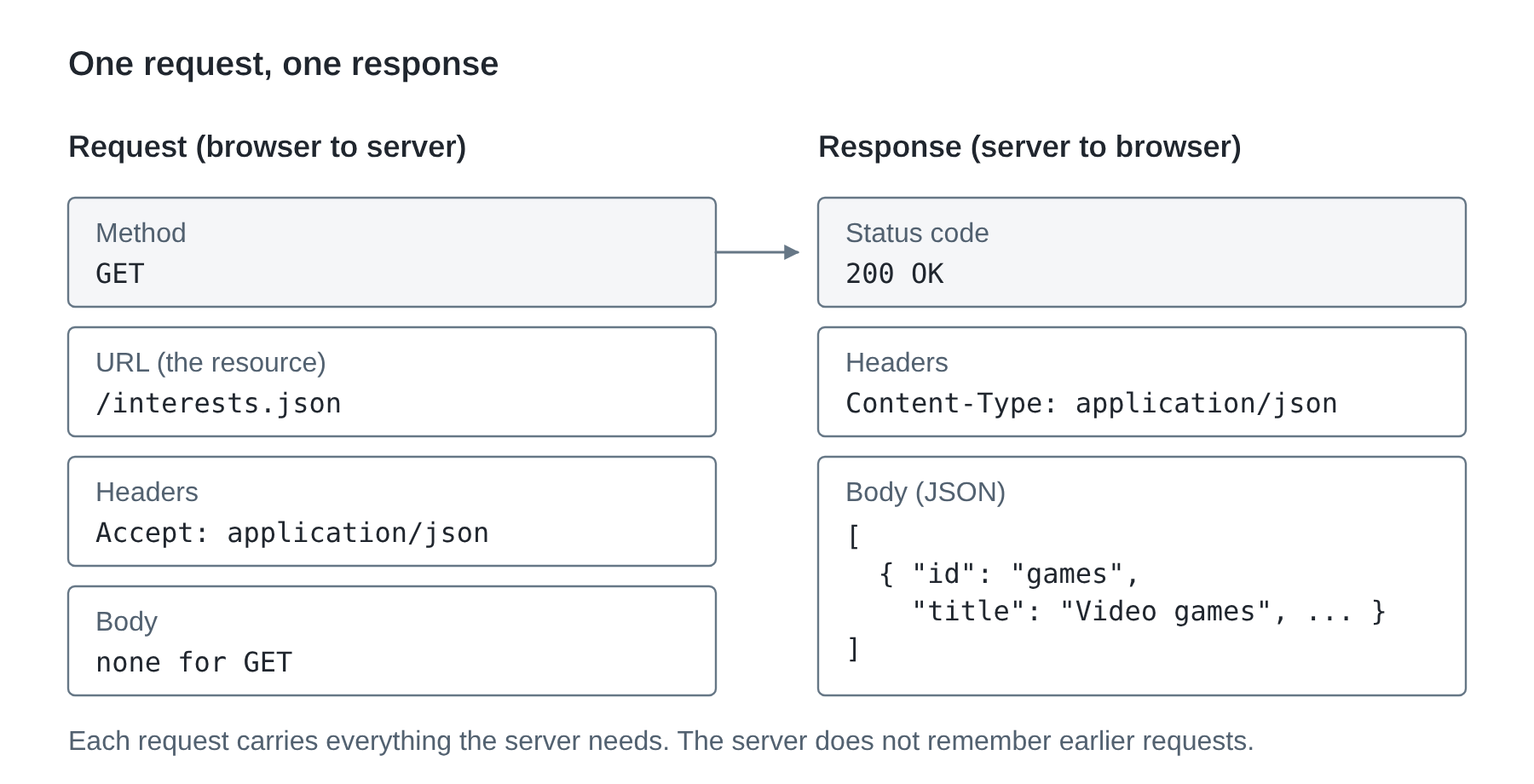
Making a GET request from React
Now we'lllet's use theseall ideas.that. Our page will send GET /interests.json, check the status code, and read the JSON body, and check the status code.body.
State for a request
Look near the start of App. The reference declares three state values:
const [interests, setInterests] = useState([]);
const [status, setStatus] = useState("idle");
const [error, setError] = useState("");
interests starts as an empty array.empty. status starts as "idle", meaning we havehaven't not requested the listasked yet. error starts as an empty string and will holdholds a message if loading fails.
WeThe chosepage uses four status words for the page:words:
| Page status | What someone should see |
|---|---|
idle |
A button and instructions to load the list. |
loading |
A loading message while the request is unfinished. |
success |
Cards, or an explanation that the returned list is empty. |
error |
An error message and a way to try again. |
These strings are our own React state.state, They are different fromnot the numericserver's HTTP status code sent by the server.code.
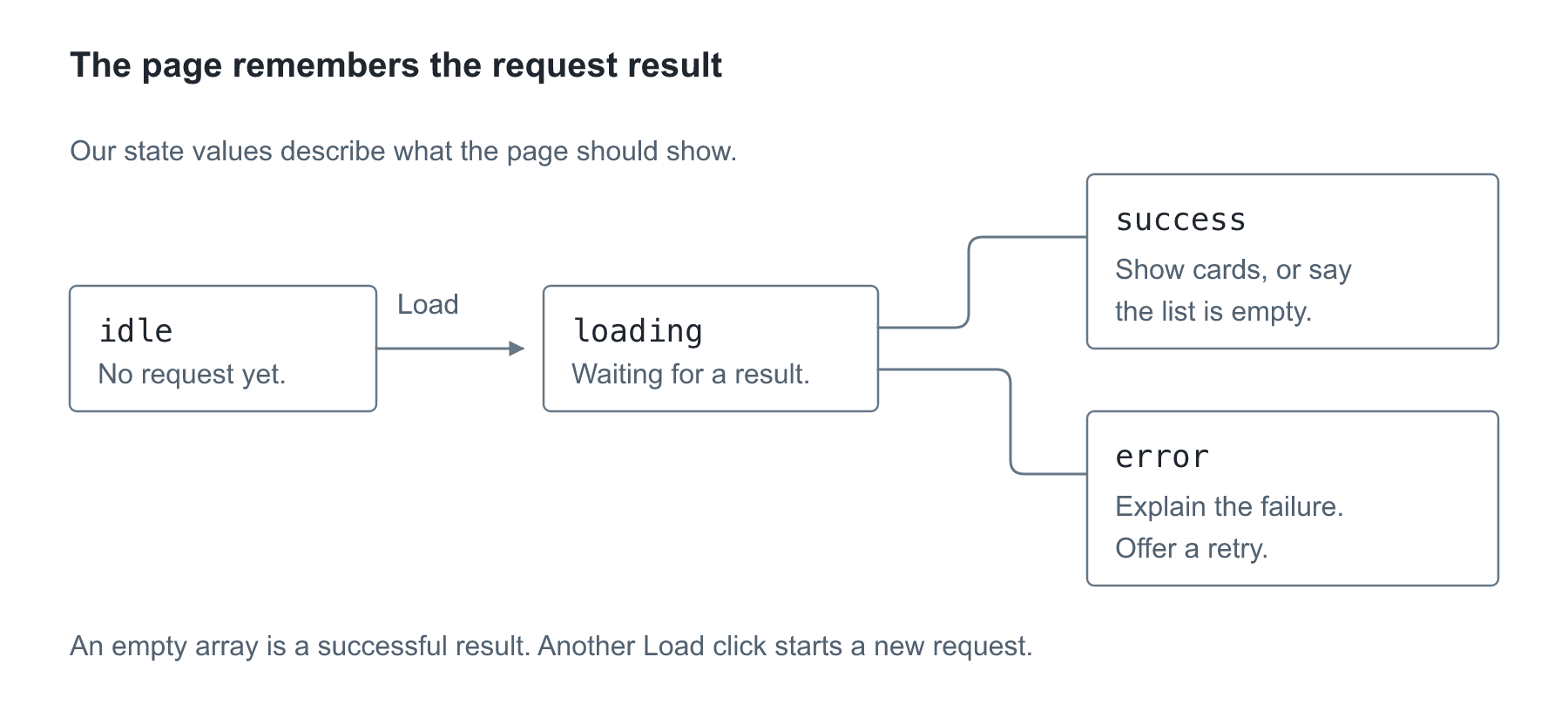
Follow the two possible results from loading. A validAn empty array belongsis tostill success:. theThe request worked, butthere's therejust are no cardsnothing to show. Anerror errormeans needswe anever different message because the page could not obtaingot a usable list.
Waiting for a response
fetch() starts ana HTTPrequest request.and Itgives returnsback a Promise:Promise, a value representingfor work that will finishfinishes later. The request may succeed or fail while the browser keeps responding to other actions.
An async function lets us use await, inside it. await the rest of that function (not the whole browser) until the operationwork settles;is it does not freeze the entire browser.done.
These are the two lines that receiveget and read our response:
const response = await fetch("/interests.json");
const data = await response.json();
fetch sends a GET request unless weyou tell it otherwise. That's the method we want for reading a resource. The first resultline isgives a Response object containingwith the HTTP status, headers, and access to the body. The second line reads the body as JSONJSON. Getting a response and producesreading the array. Theseit are two separate steps: receiving a response does not mean we have already parsed its data.steps.
We also needhave to check the status code.status. fetch still giveshands usback a Response for a 404 or 500. It only fails outright when nonothing responsecomes arrivesback, atlike all.when you're offline. response.ok is true for the 2xx codes, 200 throughto 299, so !response.ok catches the 4xx and 5xx groups. An offline request may fail before any Response arrives.
Handling failures
BeforeA adding the complete function, read thefew new bits of JavaScript used in it:first:
if (runs thecondition)x) { ... }instructions in itsbraces only whenthe conditionxis true.!means“not.”"not", so!response.okchecksmeansfor athe responsethat was not successful.failed.throw new Error("message"...")createsmakes an error andstopsjumpsthe current path through the code.out.trysurroundswrapsworkcode thatcanmight fail. If it does,catch (failure)runsif an error is thrown there and gives that error the namefailure.instead.failure.messagereadsis the error'smessage.text.+joinsstrings in these messages.strings.return;just ends thefunction immediately without returning a value.function.
The error handling is part of making the button useful: someone needs to know when the request did not work and be able to try again.
The provided isInterest function(already in the file) checks eachone object's fields before we display it.fields. Array.isArray(data) checks thewe outergot a list, and .every(isInterest) checks thatevery all its items pass the function.item. || means “or,”"or", so we reject the response if either check fails.fails we reject it.
Replace the empty loadInterests function with:
async function loadInterests() {
  if (status === "loading") {
    return;
  }

  setStatus("loading");
  setError("");

  try {
    const response = await fetch("/interests.json");

    if (!response.ok) {
      throw new Error("The request failed with status " + response.status + ".");
    }

    const data = await response.json();

    if (!Array.isArray(data) || !data.every(isInterest)) {
      throw new Error("The response does not contain the interest fields we need.");
    }

    setInterests(data);
    setStatus("success");
  } catch (failure) {
    setError("Could not load interests. " + failure.message);
    setStatus("error");
  }
}
At the beginning, we stop ifIf a request is already loading.running, Otherwise,we stop. Otherwise we show loading and clear anany earlierold error. AfterA receiving a successfulgood response with validthe data,right fields gets saved and we save the list and show success. A requestfailed error,request, unreadablebad JSON, or awrong failedfields fieldall checkland takes us toin catch.
Save and click Load interests. The cards should appear.
How the response becomes a page update
Receiving JSON does not put cards in the DOM by itself. fetch gets a response, and response.json() reads its body into JavaScript data. After the checks pass, setInterests(data) and setStatus("success") ask React to use that data and status in another render.
React calls App again. The JSX now uses the returned interests to describe cards and the success status to choose its message. React commits the needed DOM changes, then the browser can paint them. Earlier, setStatus("loading") requested the loading version of the same page. The request happens while that document stays open; we are not asking the server for a whole new HTML page.
This is the same state-to-page processupdate as Week 5's search. The newsetters ask React to render again, only now the value comescame from a response instead of a text field. If we only saved the response in a local variable and never called a setter, Reactnothing on screen would have no request to update this interface.
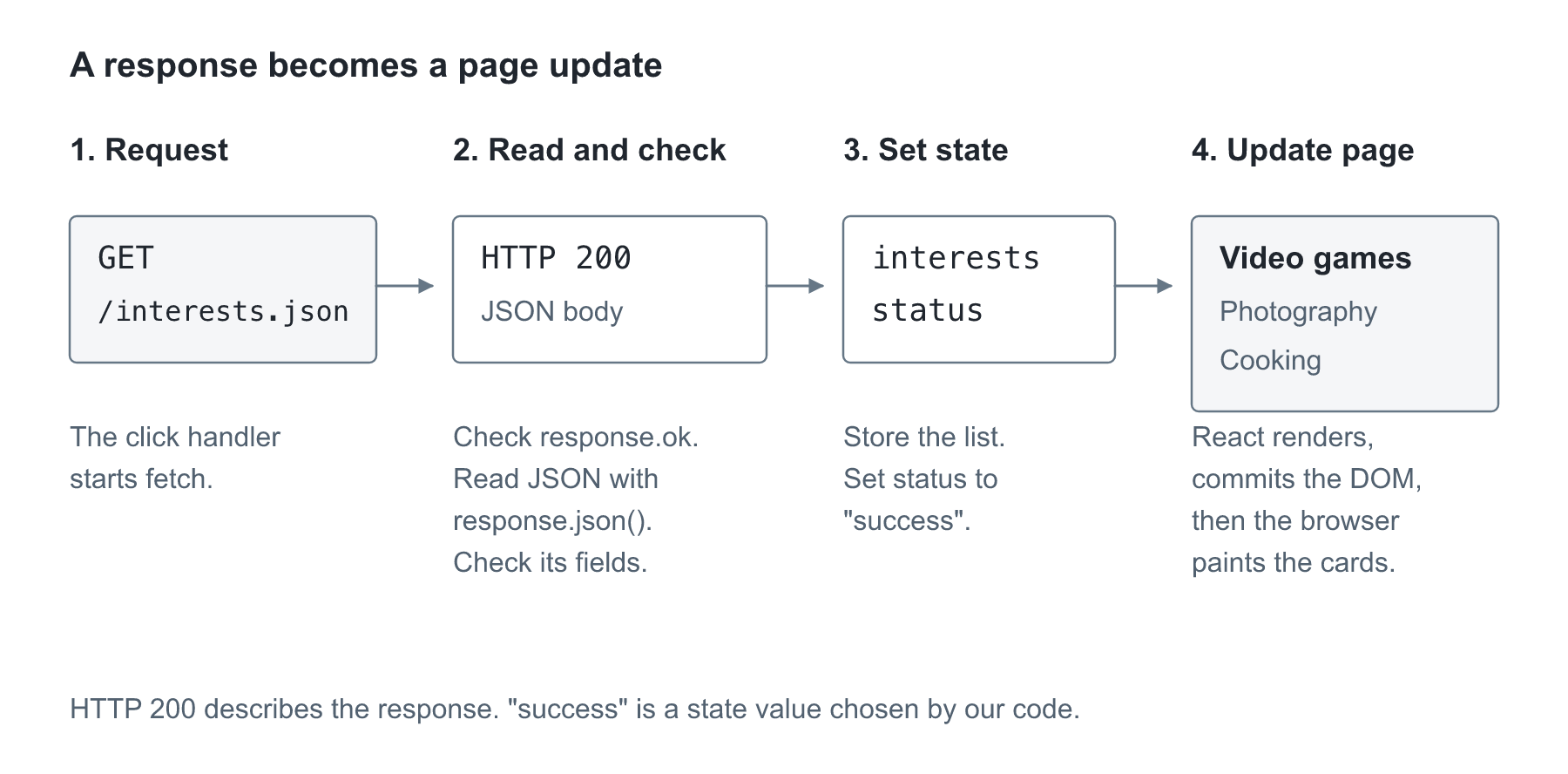
Read the picture alongside loadInterests. The response supplies data; the state setters ask React to show it. Which step would fail if the server returned an object instead of the array our page expects?change.
Checking the response's shape
Look at the supplied check near the top of App.jsx:
function isInterest(value) {
  return (
    value !== null &&
    typeof value === "object" &&
    typeof value.id === "string" &&
    typeof value.title === "string" &&
    typeof value.description === "string"
  );
}
nullrepresentswants an explicitly empty value. !== means “is not equal to.” typeof returns a word describing a value's type. This function requires a non-null object with three string fields.
typeof gives a value's type, and && requiresmeans eachevery check has to pass. JavaScript stops checking after the first false result, so it will not try to read .id from null. (We check for null separately because JavaScript'sJavaScript says typeof null is "object".
This islets us show a smallclear check for our known class file. It helps us report an unexpected responseerror instead of crashingcrashing. while drawing cards. A real product responseProducts will need checks for itstheir own fields; an isInterest function cannot validate a product or a cart.check.
Showing what is happening
<button type="button" onClick={loadInterests} disabled={status === "loading"}>
  Load interests
</button>
As withLike onChange last week, we pass the function without calling it. While loading, disabled receives a Boolean value. When the comparison is true, theso browsernobody preventscan someoneclick from pressing the button again.twice.
The page usespicks conditionsits tomessage choosewith messages.conditions, Forlike example:week 5's no-match message:
{status === "success" && interests.length === 0 && (
  <p>No interests were returned.</p>
)}
=== compares values and && requires both conditions to be true. This paragraph appearsshows when loading succeededworked andbut the returned array has zero items. An empty list is aempty. successful response with nothing to display; it isThat's not the same as a failedfailure. request.
In the full file, interests.length > 0 checks for more than zero items. role="status" lets a screen reader announce routine changes,changes and role="alert" announces an error. The error paragraph also tells you how to retry.errors.
Inspecting the request
Open the browser's developer tools with Inspect, then open Network. Keep the page open and clickClick Load interests again.again Findand find the request named interests.json. request.
Match what you seeit to the REST terms from earlier:
- In Headers, find the request URL, the method, and the status code. The URL is the resource. The method should be
GETand the status should be200. - Still in Headers, scroll to the response headers and find
Content-Type. It should say the body is JSON. - In Response or Preview, find the response body: the returned array and its objects. This is the data our function passed to
setInterests. - Compare a returned title with its card on the page.
If loadingit happensloads too quicklyfast to notice,see, useturn on throttling in the Network panel'spanel throttling control to slow the connection, thenand click again. Throttling simulates a slower connection. You should see the loading message and a disabled button while the request is pending.button. Turn throttling off afterward.
NoNothing request appearsloads until you click, since the button is clicked. The eventclick handler starts the request. There is no automatic load when the page opens in this exercise.
Try an empty list and a failure
First, saveSave a copy of the working JSON. Then replace its contentsit with:
[]
Save and click the button. You should get No interests were returned. Restore the data.
Next, change "title" to "heading" in one object. The JSON isIt's still readable,valid butJSON, it no longer matchesjust the fieldswrong our page needs.shape. Load itit, again. Findread the error message anderror, fix the propertyname, name.and Retryretry without refreshing the page.refreshing.
ForThen a network failure, choosepick Offline in the Network panel and clickclick. You should get the button.error. RestoreSwitch theback to normal connection setting before trying again. Do not leave the browser offline when you move on.after.
The failures tell us different things: an empty array is valid data, a renamed property is the wrong data shape, and an offline browser cannot complete the request.
Now ask for a resource that doesn't exist. In loadInterests,Last, change the URL in loadInterests to "/missing.json" and clickclick. the button. Look atCheck the row in Network. Vite sometimes answers some missing paths with its own HTML page and a 200, so you maymight get a JSON parsing error instead of a clean 404. Either way,way the page shows an error.error, Thiswhich is also why we check both the status code and the body's shape. Put the URL back afterward.back.
Reading API docs: Fourthwall
Our merch site will use Fourthwall's Storefront API. Its docs follow the same REST habits above,habits, so let's read them the way you'd readlike any new API. You don't need aNo token orneeded, a shop for this part. We'we're onlyjust reading.
Here are the endpoints the project will use, taken from Fourthwall's API reference:use:
| Endpoint | What it does |
|---|---|
GET /v1/collections/all/products |
Read the products in the all collection |
GET /v1/products/{slug} |
Read one product by its slug |
POST /v1/carts |
Create a new cart |
GET /v1/carts/{cartId} |
Read one cart |
POST /v1/carts/{cartId}/add |
Add items to a cart |
POST /v1/carts/{cartId}/change |
Change item quantities |
POST /v1/carts/{cartId}/remove |
Remove items |
These come from Fourthwall's Storefront API schema, checked November 2, 2026. Each one has its own reference page, for example Get Product, Create Cart, Get Cart, and Add to Cart.
{slug} and {cartId} are placeholders.placeholders You replace them with afor real value.values. AllEvery ofpath these paths startstarts from https://storefront-api.fourthwall.com.
NoticeLook at the methods. Reading usesis GET, andbut every cart change usesis POST with an action word at the endend. of the path. A differentAnother API might use PATCH to change a quantity or DELETE tohere. remove an item. Fourthwall chose POST for all three. This isThat's why weyou read the docs instead of guessing from the general rules.guessing.
A full product-list request looks like this:
GET https://storefront-api.fourthwall.com/v1/collections/all/products?storefront_token=YOUR_TOKEN¤cy=USD&page=0&size=50
This lineisn't isa command to run, just a request to read, not a command to run.read. YOUR_TOKEN is a placeholderstands for the shop's Storefront token.token, Becauseand since the API is stateless, the tokenit goes withon every request. Fourthwall puts it in a storefront_token query parameter rather than an Authorization header (Storefront getting started). currency picks the price currency, and page and size pick which slice of products comes back.
The response body, described in Fetching Products, is an object containing results and paging, not a bare array. results holds the products. paging describes the page you got: pageNumber, pageSize, totalPageselementsSizeelementsTotal, totalPages, and hasNextPage, which says whether another page exists.. This shortened example uses inventedmade-up values and leaves outskips most product fields:
{
  "results": [
    {
      "type": "PRODUCT",
      "id": "example-product",
      "name": "Blueprint shirt",
      "slug": "blueprint-shirt",
      "variants": []
    }
  ],
  "paging": {
    "hasNextPage": false
  }
}
After response.json(),So the productproducts array isare at data.results, and the first product's name is at data.results[0].name. Our interests use title., Fourthwall products useuses name. Each variant carries more information, includinghas an ID and a unitPrice, which we'll need for the cart.
The docs also list theerrors errortoo. responses.A Forslug that doesn't exist on GET /v1/products/{slug}, a slug that doesn't exist returns 404 with a JSON body whose code is OFFER_SLUG_NOT_FOUND_ERROR. Good APIs tell you what went wrong in the body,wrong, not just the status code.number.
So changingjust onlyswapping the URL in our exercise wouldwouldn't not be enough.work. We'd need to read the real response shape,a check thefor product fields we use,fields, handle more pages, and pass product values to product cards. The API can also return bundles, which have different fields, so we'll checkwatch type, since bundles come back too.
Open Fourthwall's Get Product page (linked under Resources). Forand onewrite endpoint, finddown these five things. YouIt canworks do this withfor any API's docs:API:
- The method and path.
- The required parameters, and where each goes (path, query, or body).
- The fields in a successful response.
- The error status codes it can return.
- How it expects you to prove access, such as a token.
When
One anothermore addressthing: Fourthwall is blockeda
Ourdifferent JSON file comessite from the same address as the page,ours, so the browser only lets us read it. A different site, like Fourthwall, is a different origin. The browser only lets our page read its responseresponses ifbecause that serverFourthwall allows it.it This(this rule is called CORS.CORS). Fourthwall allows browser calls to its Storefront API, but notNot every API does.
If a future request is blocked, read the Consoledoes, and Network details, check the address, then check the API's instructions for browser access. Adding mode: "no-cors" will notwon't fix it. It hides the response body from our code.
When something goes wrong
| What you see | What to check |
|---|---|
| No request in Network | Confirm the button uses onClick={loadInterests} and the function contains fetch. |
| JSON parsing error or an HTML response | Open the exact request URL. Confirm the file is public/interests.json, not src/interests.json or public/public/interests.json. |
| Wrong-field error | Check id, title, and description and confirm that the outer value is an array. |
| The page stays in loading | Check the Console, keep both success and catch status updates, and make sure you restored normal network settings. |
HTTP 401 or 403 on a future API call |
Read the response and check the service's access instructions and configured token. |
HTTP 404 |
Check the endpoint and resource ID. A missing local path may instead return Vite's HTML page, which causes a JSON parsing error. |
HTTP 429 |
Too many requests were made. Follow the API's retry guidance instead of repeatedly clicking. |
HTTP 500 |
The server reported an error. Keep the error message and retry path useful; changing the page's CSS will not fix the server. |
The meanings of other HTTP codes are listed on the MDN status codes page under Resources.
What's next
Before next week, restore validthe JSON,JSON putand the URL back to /interests.json,URL, and turn off any Network throttling orand Offline setting.Offline. Add one new interest to the JSON, load it, and check that its card shows.shows up. Commit with a message such as Load interests with a GET request and push the branch. If GitHub asks you to sign in, use the GitHub CLI steps on the Setup page.
Next week, we'll use state to choosepick a product variant and update a small practice cart. Later, those cart changes become the POST requests in the Fourthwall table above.
Resources
Everything needed for today's code and explanations is above. These are extra examples or references to return to after the exercise.
- MDN: Overview of HTTP
- MDN: Working with JSON
- MDN: Using Fetch
- MDN: async functions
- MDN: try...catch
- MDN: Response.ok
- MDN: typeof
- MDN: CORS
- MDN: HTTP request methods
- MDN: HTTP headers
- MDN: HTTP status codes
- Fourthwall: Fetching Products
- Fourthwall: Get Product
- Fourthwall: Storefront getting started
- Fourthwall: Storefront API schema
Complete practice files
Copy these files into the paths shown below. They are the same files used by the lesson. Keep the filenames and imports together. Keep last week's InterestCard.jsx (or copy the version below if you need it).
src/InterestCard.jsx
export default function InterestCard(props) {
  return (
    <article className="interest-card">
      <h3>{props.title}</h3>
      <p>{props.description}</p>
    </article>
  );
}
src/App.jsx
import { useState } from "react";
import InterestCard from "./InterestCard.jsx";
import "./App.css";

function isInterest(value) {
  return (
    value !== null &&
    typeof value === "object" &&
    typeof value.id === "string" &&
    typeof value.title === "string" &&
    typeof value.description === "string"
  );
}

function renderInterest(interest) {
  return (
    <InterestCard
      key={interest.id}
      title={interest.title}
      description={interest.description}
    />
  );
}

export default function App() {
  const [interests, setInterests] = useState([]);
  const [status, setStatus] = useState("idle");
  const [error, setError] = useState("");

  async function loadInterests() {
    if (status === "loading") {
      return;
    }

    setStatus("loading");
    setError("");

    try {
      const response = await fetch("/interests.json");

      if (!response.ok) {
        throw new Error("The request failed with status " + response.status + ".");
      }

      const data = await response.json();

      if (!Array.isArray(data) || !data.every(isInterest)) {
        throw new Error("The response does not contain the interest fields we need.");
      }

      setInterests(data);
      setStatus("success");
    } catch (failure) {
      setError("Could not load interests. " + failure.message);
      setStatus("error");
    }
  }

  return (
    <main>
      <h1>Load my interests</h1>
      <p>
        This practice page requests a JSON file from the same server as the page.
      </p>
      <button type="button" onClick={loadInterests} disabled={status === "loading"}>
        Load interests
      </button>

      <div role="status">
        {status === "idle" && <p>Click the button to request the list.</p>}
        {status === "loading" && <p>Loading interests…interests…</p>}
        {status === "success" && interests.length > 0 && (
          <p>Interests loaded: {interests.length}</p>
        )}
        {status === "success" && interests.length === 0 && (
          <p>No interests were returned.</p>
        )}
      </div>

      {status === "error" && (
        <p role="alert">{error} Check the Network tab, then click Load interests to try again.</p>
      )}
      {status === "success" && (
        <div className="interest-list">{interests.map(renderInterest)}</div>
      )}
    </main>
  );
}
src/App.css
.interest-card h3 {
  font-size: 1.15rem;
  margin: 0;
}

button:disabled {
  background: #475569;
  cursor: wait;
}

[role="alert"] {
  color: #991b1b;
  border-left: 4px solid #b91c1c;
  padding: 12px;
  background: #fef2f2;
}
public/interests.json
[
  {
    "id": "games",
    "title": "Video games",
    "description": "I like learning how games are designed."
  },
  {
    "id": "photos",
    "title": "Photography",
    "description": "I like taking pictures around Hoboken."
  },
  {
    "id": "cooking",
    "title": "Cooking",
    "description": "I like trying a new recipe each week."
  }
]