
Week 3
Before we get into PostgreSQL, we need to understand why we use databases in the first place. Right now, if our apps use dictionaries to store our data. The problem is that the data disappears when the server restarts, creating a problem in the future. A database allows us to store our data permanently so it survives restarts, crashes, and can support concurrent users.
There are two categories of databases
| Relational (SQL) | Non-Relational (NoSQL) | |
| Structure | Tables with rows and columns | Similar to JSON |
| Schema | Fixed, predefined | Flexible, schema-less |
| Relationships | Tables link with keys | Handled in the app's code |
| Query Language | SQL | Varies but usually none |
| Best for | Structured data that relates to each other | Unstructured or rapidly changing data |
| Examples | PostgreSQL, MySQL | MongoDB, Redis |
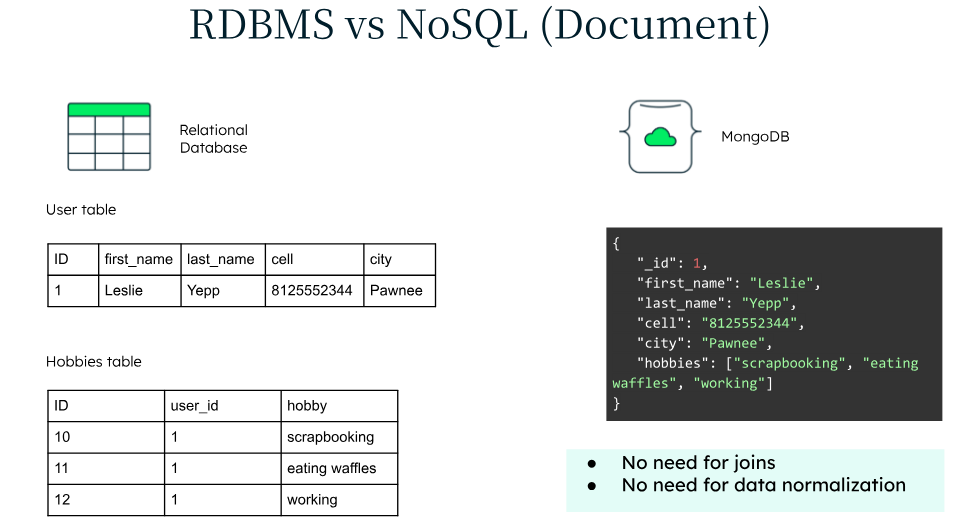
What is a relational database?
A relational database organizes data into tables. Each table represents one thing (a resource, a user, an order, etc). Each row is one record and each column is an attribute of that record, with a defined data type.
| id | first_name | last_name | |
| 1 | Miguel | Merlin | mmerlin@stevens.edu |
| 2 | Nishit | Sharma | nsharma11@stevens.edu |
Because these tables are relational, that means they can be linked to each other. An orders table can reference a user table, so every order knows which user placed it.
What is PostgreSQL?
PostgreSQL is an open source Relational Database Management System (RDBMS). The RDBMS is a software layer that sits on top of your data. It enforces rules, handles queries, and manages connections.
Tables and Schema
When you create a table in PostgreSQL, you define its schema, the column names and what type of data each column holds. You do this with CREATE TABLE
CREATE TABLE users (
    id    SERIAL PRIMARY KEY,
    name  VARCHAR(100) NOT NULL,
    email VARCHAR(255)
);
You have to define this schema otherwise, PostgreSQL will reject any data that doesn't fit the schema
Data Types
Every column has a data type that constrains what values it can store:
| Type | What it stores | Example |
| INTEGER | Whole numbers | 42 |
| SERIAL | Auto-incrementing integers (use it for IDs) | 1, 2, 3, ... |
| VARCHAR(n) | Text up to n characters | "Nishit Sharma" |
| TEXT | Unlimited length text | Long descriptions |
| BOOLEAN | True/False | true |
| DATE | Calendar date | 2026-3-25 |
| NUMERIC | Decimal numbers | 19.99 |
Primary Keys and Foreign Keys
A primary key is a column that uniquely identifies every row in a table. No two rows can share the same primary key. SERIAL PRIMARY KEY makes PostgreSQL auto assign a new integer ID to each row you insert.
A foreign Key is a column in one table that references the primary key of another table. This creates the relationship between tables
CREATE TABLE orders (
    id          SERIAL PRIMARY KEY,
    user_id     INTEGER REFERENCES users(id),
    amount      NUMERIC,
    order_date  DATE
);
In this example, user_id is a foreign key, and it must match an existing id in the users table. If you try to insert an order with a user_id that doesn't exist, PostgreSQL will reject it automatically.
Basic SQL
SQL (Structured Query Language) is the language we will use. Every operation you will perform (creating tables, inserting data, and reading data) is written in SQL.
CREATE TABLE
Defines a new table and its schema:
CREATE TABLE resources (
    id            SERIAL PRIMARY KEY,
    name          VARCHAR(255) NOT NULL,
    category      VARCHAR(50),
    description   TEXT
);
NOT NULL means that the column is required, PostgreSQL won't let you insert a row without a value there.
INSERT (Create)
Adds a new row to a table:
INSERT INTO resources (name, category, description)
VALUES ('City Food Bank', 'Food', 'Free weekly groceries for families.');
SELECT (Read)
Retrieves rows from a table:
-- Get everything
SELECT * FROM resources;

-- Get specific columns
SELECT name, category FROM resources;

-- Filter with WHERE
SELECT * FROM resources WHERE category = 'Food';
UPDATE
Changes an existing row:
UPDATE resources
SET description = 'Updated description here.'
WHERE id = 1;
Make sure to include a WHERE clause on UPDATE otherwise you will update every row in the table
DELETE
Removes a row:
DELETE FROM resources WHERE id = 1;
Relationships between tables
The most common relationship in web apps is one-to-many. This means that one resource can have many referrals, one user can have many orders.
-- One user
CREATE TABLE users (
    id   SERIAL PRIMARY KEY,
    name VARCHAR(100)
);

-- Many orders belonging to one user
CREATE TABLE orders (
    id       SERIAL PRIMARY KEY,
    user_id  INTEGER REFERENCES users(id),
    amount   NUMERIC
);SELECT users.name, orders.amount
FROM orders
JOIN users ON orders.user_id = users.id;This pulls the user's name from the users table and matches it to their orders using the foreign key relationship