Transition Documents 2026
Transition Documents for E-Board 2026-2027
- Transition Document - President
- Transition Document - VP Operations
- Transition Document - VP Design
- Transition Document - VP Recruitment
- Transition Document - VP Finance
- Transition Document - VP Marketing
- Transition Document - VP Engineering
- Transition Document - Talent Development
- Transition Document - VP Projects
Transition Document - President
Overview
As the President of Blueprint, you are the primary representative of the organization in all official matters and are responsible for setting the strategic direction and goals. Your role involves overseeing the accountability and performance of executive board members and the general membership. Leadership in this position requires you to manage a variety of tasks, some predictable and others that will challenge your problem-solving and adaptability skills. You will lead meetings, represent Blueprint at university functions, and handle external engagements. Given the broad scope of this role, I highly recommend that you familiarize yourself with the responsibilities of other executive board positions by reviewing their transition documents thoroughly. Engaging with past presidents can also provide valuable insights into effectively managing and navigating the complexities of this leadership position.
Responsibilities
Setting Goals and Initiatives
At the start of each year, it's crucial to establish clear goals and initiatives to steer the Executive Board's efforts. These goals serve as a roadmap for the organization and can range from broad objectives to specific projects. For instance, during my tenure, we aimed to:
- Define Onboarding Process for Project Team Members - A 2-4 week-long process that gives Project Team members a solid introduction to key technologies and introduces them to their team
- Increase Career Advancement Initiatives - Create an Alumni network, host recruiting events, and provide our members with more exposure.
Representing Blueprint to the Student Government Association and University Administration
As President, you are the primary liaison between Blueprint and key university bodies like the Student Government Association (SGA) and the University Administration. Here’s a list of important contacts within the SGA and Faculty that you should familiarize yourself with to maintain and establish critical relationships.
While other members of the Executive Board will also interact with university staff, you are responsible for handling official presentations and communications with the SGA.
Organizing Executive Board Meeting Agendas
For weekly Executive Board Meetings you should create agendas to guide discussions and shorten meeting times.
- Agenda: I typically write tickets on the GitHub kanban board and on the meeting minutes I leave links to them. This way the information for particular tasks remains organized and easy to find.
- Notes: Any general notes or important things discussed during the meeting I place the here. After the meeting, I review this section to see if any updates should be made to the kanban board.
The frequency and structure of your meetings can be tailored to fit the organization’s needs. During the past semester, it was proposed that the Executive Board split into two focused groups for weekly meetings, with the entire board convening biweekly. This division was suggested to improve efficiency, as some topics, such as specific projects or event formats, do not require the attention of the entire board.
-
Operations-Focused Group: This group should include the President, Vice President of Operations, Vice President of Recruitment, Vice President of Finance, Vice President of Marketing, and Vice President of Events. The focus here is on the administrative and logistical aspects of the organization.
-
Projects-Focused Group: This group should consist of the President, Vice President of Projects, Vice President of Technology, and Vice President of Design, concentrating on the ongoing projects and technological development within the organization.
Alternatively, you may opt for a stricter agenda during full board meetings to ensure that only topics relevant to all members are discussed. Issues that are extraneous or specific to certain roles should be handled individually or in smaller, relevant groups. This approach helps streamline discussions and maximizes the productivity of meetings.
Holding Executive Board Accountable
A large part of this role is delegating. You should ensure each Executive Team member abides to timelines and has the support they need to fulfill their responsibilities. In the event an E-Board member is failing in their duties, we have a policy in our constitution on handling their removal from the Executive Board. Please consult the constitution in the shared drive for details on this procedure.
If a role within the Executive Board becomes vacant, hold an emergency election ASAP. We do not have an official policy on emergency elections. Until one is established, follow normal election procedures, but expedite timelines so that you can fill roles ASAP.
Facilitating Elections
Please read the Election Guide for more details. Your responsibilities include:
- Working with the Executive Board to create a smooth and detailed Transition process
- Marketing Executive Board Responsibilities, Nomination Deadlines and Election Dates in advance
- Sending Nominations to Student Life
- Notifiying Nominees of their nominations a week in advance
- Facilitiating the actual election - you should be an impartial moderator and enforce fair standards to all candidates
Future Goals
Here are some things that I wish I could have led Blueprint into:
- Professional Development: Professional development should not be our primary goal, however, with our projects and website were are in a position to attract sponsors and create recruiting pipelines with companies. Here are some things that I think can boost Blueprint's professional development:
- Resume Review, Leetcode, and Technical Interviewing Workshops
- Alumni Panels - after this year we will have lots of Blueprint Alumni!
- Information sessions with companies
- Sponsors: GitHub, Notion, and Perplexity are more "partners" as opposed to Sponsors. I think landing a corporate sponsor that gives monetary donations will be a major selling point to students and non-profits. With that money we can pay for more Cloud Services, Merchandise, and events. Depending on how busy the Blueprint E-Board is, it might be worth appointing someone dedicated to recruiting sponsors and maintaining corporate relations.
- Standardizing (Especially Project Team Onboarding): A standardized process for new project team members, that not only includes the technical content they need, but also a social aspect will be crucial in making the teams more independent. Past project team iterations have been very dependent on the E-Board. With a thorough and planned onboarding/training process, it will improve the quality of our projects and free up time from the E-Board.
How You Can Succeed in This Role
- Get People to Buy Into the Mission: We don't get paid, and we don't get course credit for doing Blueprint. For me, the reason I enjoyed Blueprint so much was that it taught me a lot about leadership and allowed me to meet a lot of cool people. I also learned a lot of problem solving skills and when we finished projects like the website or AAD it made me feel very accomplihed. People will have different reasons for joining Blueprint. Get them to buy into the mission and it'll help immensely. I know this is super vauge but I think some tangible things you can do are organize more hang outs so that the E-Board can unwind and y'all can feel more like friends than coworkers. Establish alumni panels and career events to increase the appeal of Blueprint.
- Start Training New Leaders Early: With such a large Executive Board - we need to ensure each role is filled by capable students. The Freshman Representatives. We've also had a lack of capable Tech Leads in past projects. Whether it be through the Freshman Representative Program, Shadowing, or our project team recruitment process, it is important to ensure we have enough students to carry Blueprint on in future years.
- Delegate and Empower Your Executive Board: Sometimes you feel like it is easier to do everything yourself. And while in the short term that may be the case, it'll establish a bad pattern of accountability. We expanded the Executive Board to handle some of the more tedious work involved in different aspects. Your job as President is to ensure they are fulfilling their duties on time. Be clear with deadlines and provide constructive feedback to increase the quality of work. Give other members independence and encourage them to act in Blueprint's best interests instead of going through you for every single decision.
- Standardize Procedures: Work with the Executive board to write down and standardize procedures. This includes things like removing inactive project team members, elections, or even the approval process for making changes to the website. If we establish these precedents, it saves us time in the future and we avoid discussing points that were already brought up.
- Hold People Accountable: During my term as President I never moved to have anyone removed from E-Board.
- 1:1s with other E-Board Members: During our EBMs, I would ask for feedback on how we ran meetings/other club operations. Most of the time people said things were fine or didn't say anything. I think 1:1s are a good way to get constructive feedback that people might otherwise be afraid of saying. You don't have to do weekly 1:1s, but maybe every month to ensure you E-Board feels heard/supported and to also provide advice for you.
- Get Along with the SGA and Faculty: A good relationship with them makes our lives easier. Abide by budgeting rules and procedures and be respectful and quick in your communications with them. We now have a new Faculty Advisor as well (Patrick Hill) so use his expertise and connections!
- Make Better Use of the Summer: Over the summer it is very hard to get engagement from the whole E-Board. What I recommend is doing a monthly meeting with the E-Board, but otherwise focus more on 1:1s and smaller meetings. This will make scheduling easier and will allow you to prioritize certain tasks. Things that should be done BEFORE the school year starts include: Gathering at least 2 project proposals from Non-Profits (VP Recruitment), creating the onboarding/training process (VP Projects), planning and documenting all the internal projects for the year (VP Technology), finalizing designer resources (VP Design), finalizing PM resources, creating a detailed event list (VP Events).
Transition Document - VP Operations
Overview
Provide a high-level summary of what are the resposibilities of this role. Define the following:
- Core purpose: Explain what is the core purpose of your role
- Key collaborators: Which other e-board members do you interact with the most?
- Top advice: Add the single best advice you could give them.
Responsibilities
For each major responsibility, describe what it involves, how often you do it, and any tools/platforms used. Include lessons learned and concrete recommendations.
Example
2.1 [Responsibility Area e.g., "Setting Goals and Initiatives"]
What it involves: [Describe the task and its purpose]
How I approached it: [Explain your process, tools used (e.g., Kanban board, shared drive), and how you tracked progress]
Key goals from my term:
- [Goal 1 — note whether completed or not, and why]
- [Goal 2]
- [Goal 3]
Recommendations for your successor: [Advice on scope, prioritization, common pitfalls]
Key contacts:
| Name | Role/Organization | Context |
|---|---|---|
| [Name] | [Role] | [Why they matter / how you worked with them] |
| [Name] | [Role] | [Context] |
Future Goals
List initiatives you started but didn't complete, or ideas you never got to. Be specific about what groundwork exists and what's left to do.
[Goal/Initiative Name]
- Current status: [Where things stand]
- What's already done: [Any work, documents, or contacts in place]
- What's left: [Concrete next steps]
- Why it matters: [Brief justification]
How You Can Succeed in This Role
Key Resources
List every tool, account, document, and platform your successor will need.
| Resource | Location / URL | Access Notes |
|---|---|---|
| [e.g., Kanban Board] | [URL] | [Who has admin access] |
| [e.g., Shared Drive] | [URL] | [Folder structure notes] |
| [e.g., Constitution] | [Path in shared drive] | [Last updated date] |
| [e.g., Meeting Minutes] | [URL] | [Naming convention] |
Summer / Off-season Tasks
List tasks that should be completed before the new term begins, with owners.
| Task | Owner (Role) | Target Date |
|---|---|---|
| [e.g., "Secure 2+ nonprofit project proposals"] | [e.g., VP Recruitment] | [Date] |
| [e.g., "Finalize onboarding curriculum"] | [e.g., VP Projects] | [Date] |
| [e.g., "Plan event calendar for fall"] | [e.g., VP Events] | [Date] |
| [Add more rows as needed] |
Transition Document - VP Design
Overview
The VP of Design is the executive member responsible for leading the design team and ensuring that the design assignments of internal and projects teams get completed in time and up to quality standards. The VP of Design needs to have a creative mindset and strong leadership senses as interaction with the team and other Blueprint members is essential for coordinating projects and tasks. However, the VP of design function shall not be only limited to design related tasks, this position should be as interdisciplinary as possible.
Responsibilities
For each major responsibility, describe what it involves, how often you do it, and any tools/platforms used. Include lessons learned and concrete recommendations.
1. Lead the design team
The VP of design shall preside the design team meeting that happen every week. Also, select liaisons for the diverse projects that the Design Team is tasked with. The VP of Design shall monitor the tasks assigned at every meeting and ensure that progress is being made. The VP of Design needs to lead the design team so that it becomes an open, collaborative space.
In the last year, the design team was a structure less organization. Designers are not assigned with a single project that they have to only work for but they are encouraged to work on multiple as well as giving their feedback on all kind of design projects and tasks. Assigning designers only to specific tasks limits the creativity of the team and isolates important voices.
Key Goals:
- Monitor progress via actual metrics and facts: Track completion times and difficulty.
- Provide feedback as VP Design and as a member of the design team.
- Set up meetings and make sure that tasks are assigned.
Example
2.1 [Responsibility Area e.g., "Setting Goals and Initiatives"]
What it involves: [Describe the task and its purpose]
How I approached it: [Explain your process, tools used (e.g., Kanban board, shared drive), and how you tracked progress]
Key goals from my term:
- [Goal 1 — note whether completed or not, and why]
- [Goal 2]
- [Goal 3]
Recommendations for your successor: [Advice on scope, prioritization, common pitfalls]
Key contacts:
| Name | Role/Organization | Context |
|---|---|---|
| [Name] | [Role] | [Why they matter / how you worked with them] |
| [Name] | [Role] | [Context] |
Future Goals
List initiatives you started but didn't complete, or ideas you never got to. Be specific about what groundwork exists and what's left to do.
[Goal/Initiative Name]
- Current status: [Where things stand]
- What's already done: [Any work, documents, or contacts in place]
- What's left: [Concrete next steps]
- Why it matters: [Brief justification]
How You Can Succeed in This Role
Key Resources
List every tool, account, document, and platform your successor will need.
| Resource | Location / URL | Access Notes |
|---|---|---|
| [e.g., Kanban Board] | [URL] | [Who has admin access] |
| [e.g., Shared Drive] | [URL] | [Folder structure notes] |
| [e.g., Constitution] | [Path in shared drive] | [Last updated date] |
| [e.g., Meeting Minutes] | [URL] | [Naming convention] |
Summer / Off-season Tasks
List tasks that should be completed before the new term begins, with owners.
| Task | Owner (Role) | Target Date |
|---|---|---|
| [e.g., "Secure 2+ nonprofit project proposals"] | [e.g., VP Recruitment] | [Date] |
| [e.g., "Finalize onboarding curriculum"] | [e.g., VP Projects] | [Date] |
| [e.g., "Plan event calendar for fall"] | [e.g., VP Events] | [Date] |
| [Add more rows as needed] |
Transition Document - VP Recruitment
Overview
- Core purpose: My role as VP Recruitment is to bring in students and nonprofits (NPOs) in order for Blueprint can run strong project teams every semester. It's about finding people and orgs that are committed, reliable, and a good fit.
- Key collaborators: I worked most closely with the President, VP Projects, and Marketing team.
- Top advice:
Responsibilities
For each major responsibility, describe what it involves, how often you do it, and any tools/platforms used. Include lessons learned and concrete recommendations.
Example
2.1 [Responsibility Area e.g., "Setting Goals and Initiatives"]
What it involves: [Describe the task and its purpose]
How I approached it: [Explain your process, tools used (e.g., Kanban board, shared drive), and how you tracked progress]
Key goals from my term:
- [Goal 1 — note whether completed or not, and why]
- [Goal 2]
- [Goal 3]
Recommendations for your successor: [Advice on scope, prioritization, common pitfalls]
Key contacts:
| Name | Role/Organization | Context |
|---|---|---|
| [Name] | [Role] | [Why they matter / how you worked with them] |
| [Name] | [Role] | [Context] |
Future Goals
List initiatives you started but didn't complete, or ideas you never got to. Be specific about what groundwork exists and what's left to do.
[Goal/Initiative Name]
- Current status: [Where things stand]
- What's already done: [Any work, documents, or contacts in place]
- What's left: [Concrete next steps]
- Why it matters: [Brief justification]
How You Can Succeed in This Role
Key Resources
List every tool, account, document, and platform your successor will need.
| Resource | Location / URL | Access Notes |
|---|---|---|
| [e.g., Kanban Board] | [URL] | [Who has admin access] |
| [e.g., Shared Drive] | [URL] | [Folder structure notes] |
| [e.g., Constitution] | [Path in shared drive] | [Last updated date] |
| [e.g., Meeting Minutes] | [URL] | [Naming convention] |
Summer / Off-season Tasks
List tasks that should be completed before the new term begins, with owners.
| Task | Owner (Role) | Target Date |
|---|---|---|
| [e.g., "Secure 2+ nonprofit project proposals"] | [e.g., VP Recruitment] | [Date] |
| [e.g., "Finalize onboarding curriculum"] | [e.g., VP Projects] | [Date] |
| [e.g., "Plan event calendar for fall"] | [e.g., VP Events] | [Date] |
| [Add more rows as needed] |
Transition Document - VP Finance
Overview
The VP of Finance (AKA "Treasurer") is responsible for all of Blueprint's financial matters. This includes budgeting, handling payments, managing receipts, and coordinating merchandise orders. In the future, this role would also be responsible for managing sponsor donations. Attached to this document is Addendum E - Finance Policy as of Spring_2024.pdf. While Undergraduate Student Life provides training to treasurers every semester, you should still READ THE ENTIRE DOCUMENT. There is also another shelf in the Wiki regarding Blueprint specific expenses that you should read as well.
- Purpose of the role: Monitor the budget, track spending
- Key collaborators: Marissa Carroll (Student Life Administrative Assistant), President
- Top advice: NEVER overspend, have an itemized proper receipt
Responsibilities
Drafting a Budget for the Big Budget Meeting (BBM)
Every semester the SGA Budgeting Committee holds a meeting to decide funding for the following semester. They will email you the timelines, however, you must prepare and submit a budget by a certain deadline. Otherwise, you will have to request each individual expense the following semester via AFRs.
There are example budget from past semesters in the Google Drive. Your budget must be itemized and should include:
- Events - food/drink, supplies, prizes (if necessary)
- Operational Expenses - AWS, Canva Pro, etc
- Promotional Materials - Merchandise, Stickers, Banners, etc
Once you draft the budget, you should present it to the Executive Board for review. Someone from the Executive Board must present the budget at the BBM. As VP Finance it is your responsibility to find someone to attend and present if you cannot be there yourself.
Additional Funding Requests (AFR), Reallocations, and Rollovers
If we need more money for events, or if there was an expense that wasn't budgeted for in the BBM, you can submit an Additional Funding Request (AFR) through Ducklink.
To change how funds are used you would submit a Reallocation Request through Duckliink. Here are some examples of when you might do a realloaction:
- Changing the specific food/drink or vendors used at an event
- Changing event formats entirely
AFRs and Reallocations must be itemized spreadsheets (examples in the Google Drive). You can submit these requests anytime throughout the semester, but try to do them at least 2 weeks in advance of when we need the funds. Typically these requests are due Wednesday night at 11:59 P.M and than you must explain the changes to the SGA Budgeting Committee during one of their Sunday meetings, so the process takes about a week.
There is also another type of request called Rollovers, where unused funds can be pushed to the next semester. NO Spring to Fall Rollovers - use all funding in the Spring Semester. An example expense that might get rolled over is AWS Credits.
Payments & Receipts
All Payments and Receipts are uploaded through the Money --> Budgeting page on Ducklink.
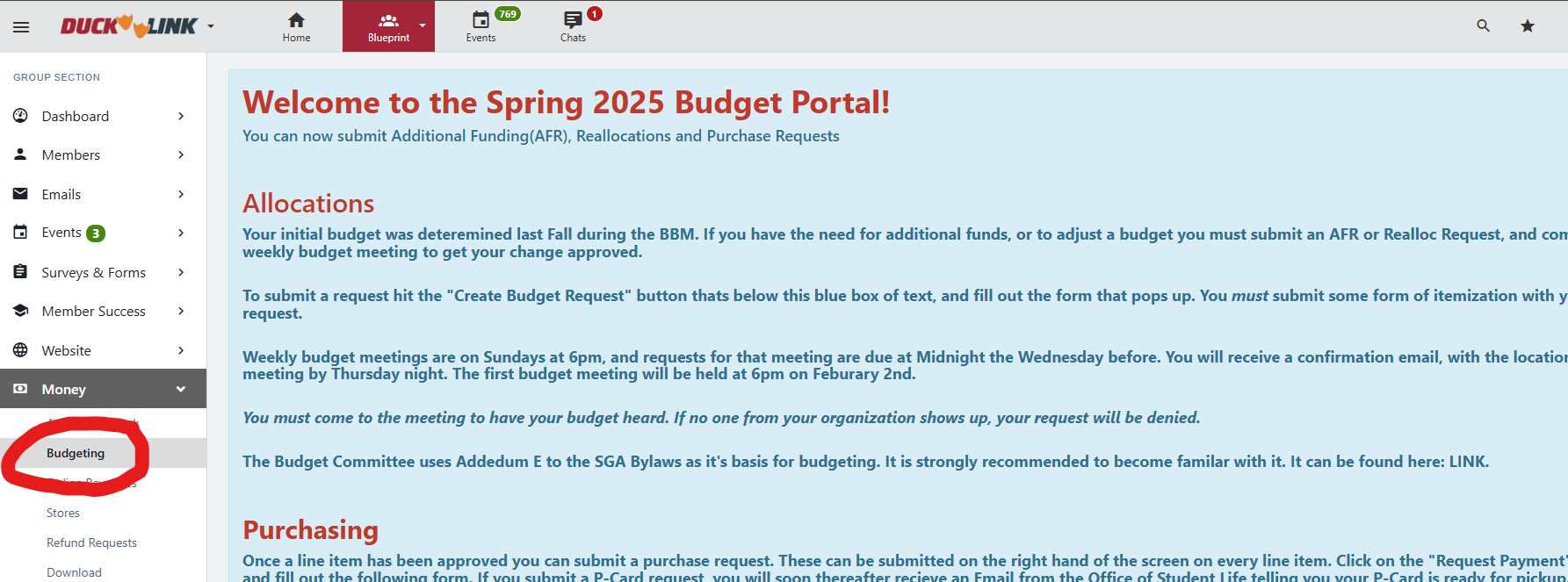
There are 2 main methods to make payments: P-Card and Invoices. You will receive training from Student Life on how to do both, but for this guide, I will leave brief instructions for P-Card purchases since that is the method we use the most. P-Cards are Credit Cards that we can pick up in person to make payments or add to accounts like Canva Pro and AWS.
Steps
- Click "Request Payment" on the specific expense in question

- Fill in the details as needed (note - you must fill this information out in order to pick up the P-Card. Once the payment is made, when you return to this form to upload receipts change the "From Allocated" category to the actual amount spent)

- Enter P-Card for type of payment request

- Enter the remaining details on the form. Note: Select SGA Funding and use the account number 1201669

- After the form is submitted you will be able to pick up the P-Card for purchases. Do this at least 2-3 days in advance! Once you make your payments, you will have to upload receipts in this same form. However, to access it you click the payment request ID in Ducklink


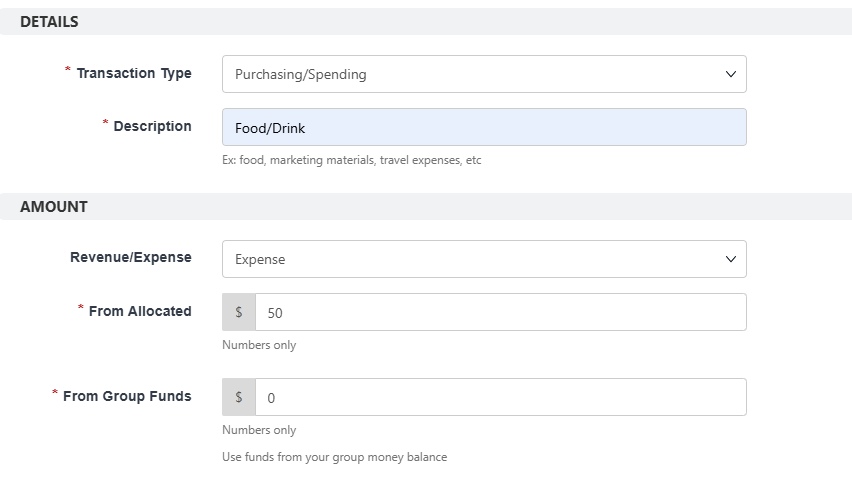
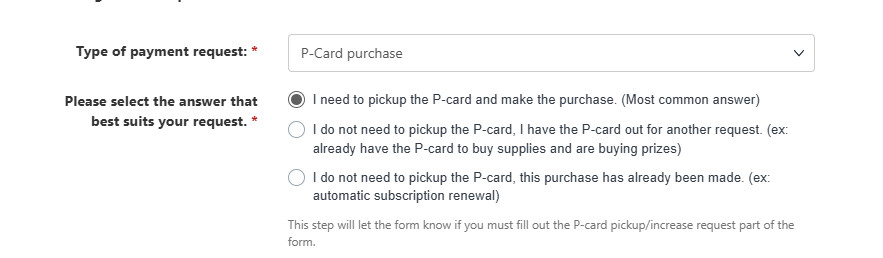
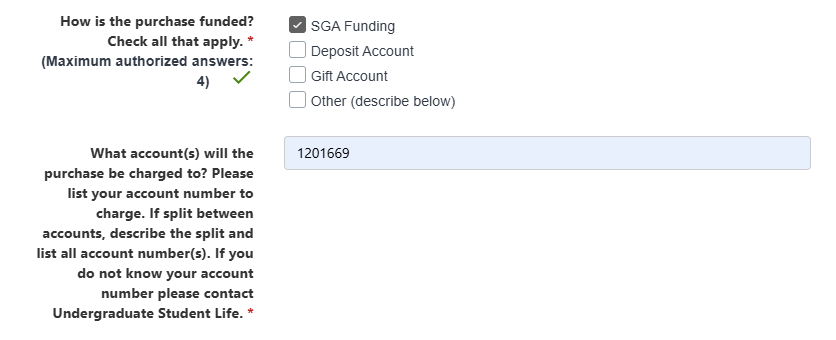

Notes:
- Stay as true to the budget as possible. You don't have to buy the exact same brand/item that was listed, but you should if possible. Failure to do so could result in sanctions for Blueprint
- Itemized receipts! Take a picture of the receipt as soon as you get it. Also retain the paper copy just in case. Student Life is very particular on receipts, and if they are missing information than our organization can face sanctions. All receipts should include:
- Date of Purchase
- Place of Purchase (name/logo of vendor)
- Vendor Address (if purchased in person)
- Itemization of what was purchase, must clearly list what you bought and unit cost
- Total cost
- Last 4 digits of card used
- Must be clear pictures, must be in English and should not be handwritten
Merchandise Orders
If there are any orders for Merchandise you will be responsible for collecting payments and sending out the order forms. If we have budget for merch than you can do it through Ducklink. If you students are paying out of pocket, I typically create a Google Form and a Venmo to handle all of the ordering.
Gift Account
We currently have a temporary gift account. We are in the process of opening our permanent account. We currently use the miscellaneous gift account GF3100006, Gifts for Miscellaneous Student Groups. To make a donation, donors must go to https://www.givecampus.com/campaigns/68402/donations/new?amt=100.00 and select the fund “Student Activities”. Once a donor makes a contribution, you must notify Marissa of the donor's name so that Marissa can set it aside for us. You don't need to get SGA approval to spend the gift account fund.
Update the Budgeting Dashboard
Update the Budgeting Dashboard to ensure all e-board members have clear visibility into operational spending and costs, with regularly refreshed metrics that improve transparency and support informed decision-making.
Future Goals
Operational Tools Expansion
Engaging with the project teams and the VP of Engineering to identify and acquire additional operational tools.
- Current Status: I’ve been gathering input from members on tools they’d find useful. For example, VP Design requested Flaticon, and VP Recruitment expressed interest in Clay.
- Next Steps: Create and distribute a Google Form to project teams and internal members to collect requests for additional operational tools, including their intended use and estimated cost.
- Why It Matters: A significant portion of Blueprint’s budget goes toward operational costs, and since the organization is built on technology, having the right tools in place is essential for efficiency and impact.
How You Can Succeed in This Role
- The most important part is managing a good relationship with SGA.
- Have the correct receipts, and make sure it is itemized and is separate for different categories
- Plan in advance. make sure you request the pcard 3-4 business days in advance.
- always ask question when you are unsure, especially to marissa.
- follow the SGA rules
Summer / Off-season Tasks
List tasks that should be completed before the new term begins, with owners.
| Task | Owner (Role) | Target Date |
|---|---|---|
| Crafting Fall Semester Budget | VP Finance | April (GA will notify exact date) |
| Crafting Spring Semester Budget | VP Finance | December (SGA will notify the exact date) |
| Budget Dashboard | VP Finance | Beginning of Fall |
Key Resources
Key contacts:
| Name | Role/Organization | Context |
|---|---|---|
| Marissa Carroll | Student Life Administrative Assistant | Located: Duck Link (mcarroll1@stevens.edu). |
Key resources:
| Name | Source |
|---|---|
| Finance Policy | Addendum E - Finance Policy as of Spring_2024.pdf. |
| Budget Dashboard | Example of Spring 2026 Budget Dashboard |
| Budget Template | Budget Template |
Transition Document - VP Marketing
Overview
The VP of Marketing is responsible for promoting Blueprint’s mission across campus and keeping members informed about what’s happening within the organization. From managing social media to posting important announcements on Discord, this role requires a solid understanding of all aspects of Blueprint. You will be planning the marketing timeline per semester and delegating relevant tasks as well as maintaining brand image with website through Design team. This document outlines the key responsibilities of the VP of Marketing and offers advice on how to thrive in the position. You will be working closely with VP Design for designing posters, VP Recruitment to ensure alignment with sponsor marketing and VP Engineering to ensure designs match the image portrayed on our website.
Responsibilities
Announcements
When making announcements for events, application timelines, etc., we post on three different platforms to ensure that as many students as possible see it:
Posts go out on Monday. Day before and day of reminder texts are sent.
-
Discord – Our primary form of communication. Use the
#announcementschannel and@everyone. Make sure to double-check the announcement to ensure that all the details are accurate and there are no spelling or grammatical mistakes. If it’s an event, make sure to include the flyer in the announcement as well. Draft your messages in#marketing. -
Instagram – For events, we typically post the flyer. In the caption, provide the event details as well as a brief description of what the event/GBM is about. Ensure that the poster is zoomed out, and utilize the Spotify playlist here (access granted by Lucas Ha) for music. Recap posts go out the following week, including pictures of the event and a thank you!
Additional Instagram tasks include:
-
Reply to all comments
-
Connect with:
-
Incoming students
-
Tech professionals
-
Blueprint alumni
-
Here are some helpful videos for posting. -
- Making a Post & Story
- Making a Reel
-
Newsletter – The weekly newsletter should be sent out every Monday so it gives students enough notice for the following week's events. The content for the newsletter is typically a roundup of the week’s announcements and upcoming events. Include any important reminders or deadlines. Refer to this guide for how to send the newsletter.
While there is no strict timeline, we typically announce on all three platforms at least one week in advance, then provide a reminder the day of or the day before via Discord and our Instagram story. There is no need to mass email members for individual announcements unless decided on by the E-Board. For example, if applications for project teams are due, we might make an exception and send a mass email instead of waiting for the weekly newsletter.
Social Media Management
Firstly, before the start of every semester, the VP of Marketing will work with VP Operations & President to confirm the preliminary event schedule and establish a marketing calendar for all the following tasks to be completed in a timely manner by the respective team member.
Blueprint is active on Instagram and LinkedIn. Your responsibility is not only to maintain announcements but also to grow these platforms and showcase our work. Currently, our Instagram is filled mainly with clipart flyers — we’d love to see more content highlighting our members and team culture in the future. Feel free to archive old or irrelevant flyers and make use of the pin feature.
LinkedIn is geared toward more professional content. This includes announcing the hand-offs/recaps of Non-Profit projects and celebrating important milestones like the launch of our website. You can also post about alumni events, recruiting events, and member accomplishments.
As we grow, we need to keep our professional network informed about our accomplishments. This requires handwriting all of our posts. We value the human aspect at Blueprint and it is unacceptable to generate posts. AI assisted writing is permitted only if it is not creating the content using AI. Marketing Team must attach relevant images from the event to these posts.
To access the LinkedIn and Instagram, you must be made an administrator by a current Blueprint Admin to make posts. Please reach out to Ananya Shrivastava (ashrivas1@stevens.edu) if you need access.
Ensure Photos are Taken At Events
You do not have to be the photographer yourself, but ensure there is a dedicated person taking photos at events or GBMs. Once photos are taken, upload them to the "Photos" folder on our shared Google Drive.
Flier Creation for Events/GBMs
We have a Canva Pro subscription — check the Password Manager for access. Undergraduate Student Life requires flyers to book rooms, so make sure your flyer is completed at least one week in advance. Canva Pro includes premium assets, so feel free to get creative! Here is our design guide for you to be able to create fliers and request the help of design team appropriately.
Each flyer should include:
-
Day/Date – e.g., Thursday, 3/27
-
Time – e.g., 9:15 P.M.
-
Room – e.g., Babbio 210
-
Event Title – e.g., "Coffee & Code"
-
Brief Description – What the event is about; highlight free food if applicable
-
Blueprint Logo (optional)
-
Logos of Collaborating Organizations – If applicable
Aim for clarity and visual appeal — your flyer is often the first impression someone will get of our event!
For fliers, Stevens has some requirements and disclaimers that we must include.
For Events & GBM Fliers:
"People of all identities are welcome to participate in programs offered by Blueprint. Stevens does not discriminate against any person on the basis of sex, race, religion, disability, sexual orientation or gender expression or any other basis prohibited by law."
For Public LinkedIn Posts/Website Correspondence:
"The views and opinions expressed on this channel are solely those of Stevens Blueprint and do not necessarily reflect the official policy or position of Stevens Institute of Technology."
Graduation & Merch
Gathering student interest on topics such as graduation stoles, cords and merch is your responsibility. Try and make sure communication is as direct as possible (send out final interest forms with payment information). There should be example forms in the drive to use as templates.
Future Goals
Project Teams Promotional Videos
We wanted to make really cool videos about ourselves so that Blueprint leaves a lasting impression. Check out this video from another chapter as our inspiration.
- Current status: Filmed content mostly available (must film Lucas)
- What's left: Script and film Lucas' part and start joining videos together and finish video
- Why it matters: To promote and grow our presence with sponsors, NPOs and students with visually impactful media.
Short Form Videos
In order to maintain our relationship with the student body, the marketing team will strategize to create relatable content to post on our social media platforms. Examples include DIAL videos of summer internships, Blueprint conferences, Blueprint event recaps and more.
- Current status: Published Day in a Life videos
- What's left: Make more fun and relevant blueprint reels
- Why it matters: To promote and grow our presence with students and appeal to student body
Marketing Team
You may find yourself in need of someone to assist with promotions. From writing, to creating and posting, this role can be a lot of work! Here are some roles to consider having on your team.
- Scribe
- Writing all the text to be posted on various platforms
- Creator
- Responsible for weekly posters and design content to be released on platforms
- Photographer
- Responsible for the media and videos utilized for the content to be posted & creating short-form content to longer videos to be posted for student engagement & general visibility
- Current status: In ideation should you need it
- What's left: Recruitment and beyond
- Why it matters: To create strong content and not burn out one role!
How You Can Succeed in This Role
Be Creative and Grow Social Media
Your job is not just to post announcements! Think of ways to spread the word about Blueprint’s mission and market the appeal of our organization. Take inspiration from other clubs on campus and don’t be afraid to voice your opinions on how to improve Blueprint’s visibility and branding.
Kudos
One thing about Blueprint that left a lasting impression on me was how much everyone uplifted one another. There will be bumps along the way, however as a favorite quote of mine goes "break all the rules but stick with the team" (or something). You will have to choose between doing things your way or how your team wants to but you will make the right decision every time. Just don't forget to use your role to uplift your team back - highlight their progress and achievements too!
Stay Organized
This is a very detail-oriented role, so staying organized is paramount. Use the E-Board meeting minutes and our shared Google Calendar to stay on top of event dates and deadlines. Try and ensure posters are done as early as possible to push out unexpected PR for collabs and recaps instead during the school year. Organize your files, documents, and contacts in a logical manner so that they are easily accessible when needed.
Be Proactive with Communications
Stay on top of communications as soon as event logistics are finalized, your role will require a lot of communication with everyone on the team.The timing of announcements is important — if you’re waiting on details from another E-Board member, follow up early! Be prepared to address questions or feedback from Blueprint members.
Be Strategic with Announcements
Too many announcements can be counterproductive and cause members to tune out. Keep communications detailed but concise. Use formatting (bold or italics) to highlight key information like time, location, and deadlines.
The Exec Team is Here for You
Remember, you’re not working in isolation. You’ll work closely with the VP of Engineering, VP of Operations and VP Design. If you ever need support or have questions, reach out to the President as well. The executive team is a resource for brainstorming, troubleshooting, and offering fresh ideas.
Key Resources
List every tool, account, document, and platform your successor will need.
| Resource | Location / URL | Access Notes |
|---|---|---|
| Canva | https://www.canva.com | design@sitblueprint.com |
| Discord | everchanging invite | N/A |
| Drive | N/A | mmerlin@stevens.edu |
| Wiki | https://wiki.sitblueprint.com | N/A |
| https://www.instagram.com/stevensblueprint/ | ashrivas1@stevens.edu | |
| https://www.linkedin.com/company/stevens-blueprint/ | mmerlin@stevens.edu |
Summer / Off-season Tasks
| Task | Owner (Role) | Target Date |
|---|---|---|
| Marketing Calendar | VP Marketing | Aug 1 |
| Posters for Fall (post event planning) | VP Marketing | Sep 1 |
Transition Document - VP Engineering
Overview
Provide a high-level summary of what are the resposibilities of this role. Define the following:
- Core purpose: Explain what is the core purpose of your role
- Key collaborators: Which other e-board members do you interact with the most?
- Top advice: Add the single best advice you could give them.
Responsibilities
For each major responsibility, describe what it involves, how often you do it, and any tools/platforms used. Include lessons learned and concrete recommendations.
Example
2.1 [Responsibility Area e.g., "Setting Goals and Initiatives"]
What it involves: [Describe the task and its purpose]
How I approached it: [Explain your process, tools used (e.g., Kanban board, shared drive), and how you tracked progress]
Key goals from my term:
- [Goal 1 — note whether completed or not, and why]
- [Goal 2]
- [Goal 3]
Recommendations for your successor: [Advice on scope, prioritization, common pitfalls]
Key contacts:
| Name | Role/Organization | Context |
|---|---|---|
| [Name] | [Role] | [Why they matter / how you worked with them] |
| [Name] | [Role] | [Context] |
Future Goals
List initiatives you started but didn't complete, or ideas you never got to. Be specific about what groundwork exists and what's left to do.
[Goal/Initiative Name]
- Current status: [Where things stand]
- What's already done: [Any work, documents, or contacts in place]
- What's left: [Concrete next steps]
- Why it matters: [Brief justification]
How You Can Succeed in This Role
Key Resources
List every tool, account, document, and platform your successor will need.
| Resource | Location / URL | Access Notes |
|---|---|---|
| [e.g., Kanban Board] | [URL] | [Who has admin access] |
| [e.g., Shared Drive] | [URL] | [Folder structure notes] |
| [e.g., Constitution] | [Path in shared drive] | [Last updated date] |
| [e.g., Meeting Minutes] | [URL] | [Naming convention] |
Summer / Off-season Tasks
List tasks that should be completed before the new term begins, with owners.
| Task | Owner (Role) | Target Date |
|---|---|---|
| [e.g., "Secure 2+ nonprofit project proposals"] | [e.g., VP Recruitment] | [Date] |
| [e.g., "Finalize onboarding curriculum"] | [e.g., VP Projects] | [Date] |
| [e.g., "Plan event calendar for fall"] | [e.g., VP Events] | [Date] |
| [Add more rows as needed] |
Transition Document - Talent Development
Overview
Provide a high-level summary of what are the resposibilities of this role. Define the following:
- Core purpose: Explain what is the core purpose of your role
- Key collaborators: Which other e-board members do you interact with the most?
- Top advice: Add the single best advice you could give them.
Responsibilities
For each major responsibility, describe what it involves, how often you do it, and any tools/platforms used. Include lessons learned and concrete recommendations.
Example
2.1 [Responsibility Area e.g., "Setting Goals and Initiatives"]
What it involves: [Describe the task and its purpose]
How I approached it: [Explain your process, tools used (e.g., Kanban board, shared drive), and how you tracked progress]
Key goals from my term:
- [Goal 1 — note whether completed or not, and why]
- [Goal 2]
- [Goal 3]
Recommendations for your successor: [Advice on scope, prioritization, common pitfalls]
Key contacts:
| Name | Role/Organization | Context |
|---|---|---|
| [Name] | [Role] | [Why they matter / how you worked with them] |
| [Name] | [Role] | [Context] |
Future Goals
List initiatives you started but didn't complete, or ideas you never got to. Be specific about what groundwork exists and what's left to do.
[Goal/Initiative Name]
- Current status: [Where things stand]
- What's already done: [Any work, documents, or contacts in place]
- What's left: [Concrete next steps]
- Why it matters: [Brief justification]
How You Can Succeed in This Role
Key Resources
List every tool, account, document, and platform your successor will need.
| Resource | Location / URL | Access Notes |
|---|---|---|
| [e.g., Kanban Board] | [URL] | [Who has admin access] |
| [e.g., Shared Drive] | [URL] | [Folder structure notes] |
| [e.g., Constitution] | [Path in shared drive] | [Last updated date] |
| [e.g., Meeting Minutes] | [URL] | [Naming convention] |
Summer / Off-season Tasks
List tasks that should be completed before the new term begins, with owners.
| Task | Owner (Role) | Target Date |
|---|---|---|
| [e.g., "Secure 2+ nonprofit project proposals"] | [e.g., VP Recruitment] | [Date] |
| [e.g., "Finalize onboarding curriculum"] | [e.g., VP Projects] | [Date] |
| [e.g., "Plan event calendar for fall"] | [e.g., VP Events] | [Date] |
| [Add more rows as needed] |
Transition Document - VP Projects
Due to the nature of the projects, VP Projects is a very cyclical role and thus does not have any major carryover tasks from one year to the next. Since there has not been a lot of structure in the past, I spent the last year trying different things and seeing what works. At the end of this document, I will list some problems and potential improvements that I would have focused on for the upcoming year, but of course, it is up to you to decide.
Here is a month-to-month outline of VP Projects responsibilities:
April
- Developer onboarding
- Unless developers have been on internal team (and graduated to project teams), you will need to onboard new developers with our tech stack and development process. We have also run one in-person onboarding session per semester in the past (Google Slides link here), but it is up to you whether or not you think this is necessary.
- While developers are onboarding, you can use the #onboarding-developers channel in Discord to send out any messages to them, including their summer tasks. You can also see my previous messages regarding their onboarding tasks, but I’ll list them here too:
- Reading Agile/Scrum basics: This needs to be updated to more accurately reflect the development lifecycle at Blueprint and not just agile/scrum.
- Frontend/Backend roadmaps: I can give you access to these if you want to change anything, but they just cover basic articles for things that they might use. We treat all developers as full stack developers now, so reading both instead of just one would be a good idea.
- Git/GitHub challenge: A small exercise to confirm that developers know Git and GitHub, and won’t cause major headaches down the line (you’re free to test this out if you’d like).
- We used to have a developer challenge (similar to the application challenge) but I don’t think this is necessary anymore. Instead, it would be nice to do some workshops or challenges with AWS (basic IAM permissions, deploying Lambdas, etc), system design, and AI tooling (CLI agents, our internal AI tooling, etc). This could possibly be done during the in-person onboarding session, or as a summer assignment via GitHub Classroom or any other tool.
- Project lead onboarding
- As we no longer have product managers, and instead have project leads, they will require a new type of onboarding. Unfortunately, I don’t have anything prepared for you :) But I’m confident that both you and Alexis have the knowledge to help them onboard for the upcoming year. I would recommend doing minimal onboarding (familiarity with AWS/deployment pipelines, reading over previous architecture docs, planning sprints, etc) and actively helping them through the first month or so (writing architecture docs, semester timeline planning, writing initial tickets, coordinating with design team, etc).
May
- Project handoff
- Discuss with VP Engineering/President the optimal way to go about handing off the project to the NPO. This can include things like deployment options for the nonprofit and ensuring proper documentation/repository handoff.
- Review NPO applications
- This will happen in Late May, so make sure to follow up with any potential nonprofits if they have not submitted their project application yet. Currently, Greg has said that they will have another, more complex project that he will send a proposal for, but has also invited us to make a post on the OR forum to seek new projects. I think this will be extremely important! Hopefully there will be enough interest in the community for 4 projects. If, for some reason, there aren’t enough projects, then you’ll have to work with Pranav (new VP Engineering) to see what kind of internal tooling project(s) you guys can come up with. However, I think there is a lot of need for our services, it just comes down to what kinds of projects suit our organization best. Speaking of which…
- I sent out a returning developer form a while ago to gauge what developers might want to do for next year. A lot of people said agentic AI, so I would look for projects that might include that. In general, projects that go beyond simple web apps are going to be the most engaging. Good examples of this include Open Referral, Sarapis, and NYCMesh, all of which you can find documentation for in the Projects folder in Google Drive. Absolutely NO CMS work! We have done a lot of CMS projects in the past and they are extremely boring and mundane.
June
- Finalize list of NPOs
- Not much needs to be said. Narrow down the list of NPOs and send out emails to them with an acceptance/rejection.
- Send out project team preference form
- Once the list of nonprofits is finalized, send out a project team preference form to the project leads and developers. This is just a first come, first serve basis. Then, team members will be assigned roles in Discord for their respective teams, and project leads will choose a senior developer.
July
- Project lead/senior developer plan out architecture
- As mentioned before, I would recommend you and Alexis to help them out with this. Basically, the goal is to have an architecture draft that can be shown to the PoC to get feedback on during the initial meeting.
- Initial meetings between project lead/senior developer & NPO
- The PL/SD should meet with the nonprofit at least once in July to meet the points of contact, and get an idea of exactly what they’re looking for.
August
- Finalize architecture, set up environments, write initial tasks
- While staying in regular contact with the nonprofit, the PL/SD should finalize the architecture, set up all production and test environments on AWS and GitHub, and write initial tasks for developers. I would recommend going to the first meeting of each team in September to introduce yourself and make sure that everything is on track.
October
- One-on-one project lead meetings
- Whether or not you want to run these is up to you. I liked to hold them monthly, but there might be a better format for this.
November/December
- Dev onboarding (fall application cycle)
- Same as spring onboarding, except no new project leads.
- 1 on 1 dev meetings
- Again, up to you to decide if you want to hold these. I liked to do these once a semester, and got some pretty valuable feedback each time.
January
- Project lead/senior developer plan out spring semester
- Same as July/August planning. Should be done during winter break (start a few days after the new year).
March
- Returning developers & project leads
- Send out forms for returning developers and project leads. We got lucky this year, and we have exactly 4 project leads, but if there is more/less interest in the role, then you may have to do some interviews or convince people to apply.
Reflections
Here are some of my reflections from the previous year:
- We have historically had an extremely low percentage of our developers be female. Now that we have a lot more women on the executive board, I think this will be less of a problem, but I know that there are talented women in CS out there :) Perhaps partnering with SWiCS or reaching out specifically to women in any eboard member’s CS classes might be a good way to solve this.
- Not many people know how to run/structure meetings, so giving them some guidance is great. I like to start with a brief status roundtable, then go into deep dive topics (which I have prepared before the meeting) and discuss any blockers that might come up, all while taking meeting notes/minutes. There should be templates for this (and everything mentioned in this doc) in the Google Drive. Personally, I hate long meetings, so I try to only discuss or do things that are important to do with everyone there in-person.
- Give project leads some flexibility on how they want to run their teams. This past year was the first time we had any kind of actual structure, so I would often tell the project leads how to run their teams. However, as the structure has come together over time, I realized that people had different methods of leadership that came to the same result. If I had to do this again, I would give them the tips and tools but not force them to use it.
- However, I really do think that sprint planning is the way to go for project management. I think this would be helpful from a developer perspective as well, as it gives them more insight into the planning (at the beginning of the spring) versus having a constant stream of tasks that are created by the project lead. Developers have overwhelmingly said that they want to have more product ownership, and would like more DevOps and system design skills.
- The ideal workload is around 3-5 hours per week. A good way to gauge this is simply by asking developers, and then following up with the project lead to discuss potential changes if it is too much/too little work.
As a final note, VP Projects is there to identify and make large structural changes to the way project teams are run, not to actively contribute to or make decisions for the teams. I am sure you understand this already though, and I have no doubt that this upcoming year will be the best experience for project team members in Blueprint history.
Brandon