
Week 1
This week, we're starting with HTML and CSS. We'll use them to build a personal page with a heading, a picture, and some information about ourselves. We'll keep working on this page over the next few weeks, adding JavaScript and learning how to share changes through GitHub.
Later, we'll use what we've learned to build one shared Blueprint merch site. Teams will receive different tasks for that site. A product page needs a name, a picture, and a description, so a lot of what we do today will also apply there.
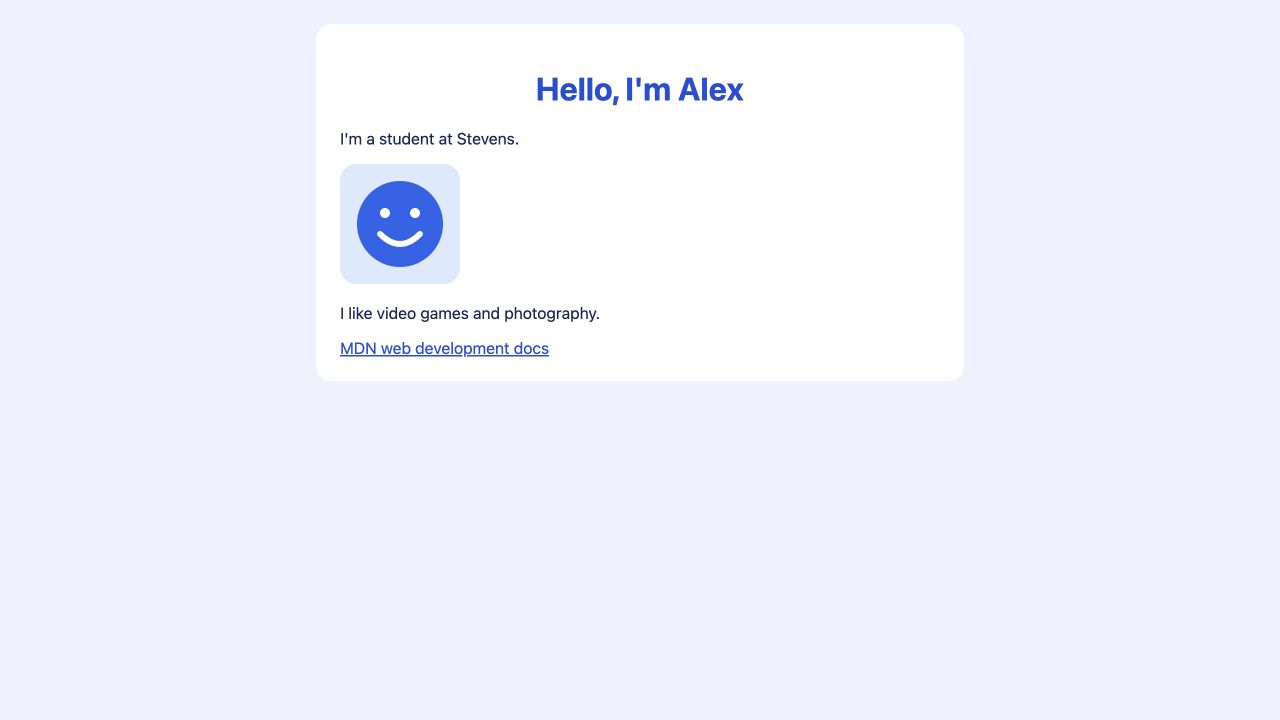
This is the page we'll be making. You can replace the example's name and interests with your own as we go.
HTML and CSS
HTML describes the content and structure of a web page. It tells the browser which text is a heading, which text belongs in a paragraph, and where to place an image. CSS controls how that content looks, including its colors, font, and spacing.
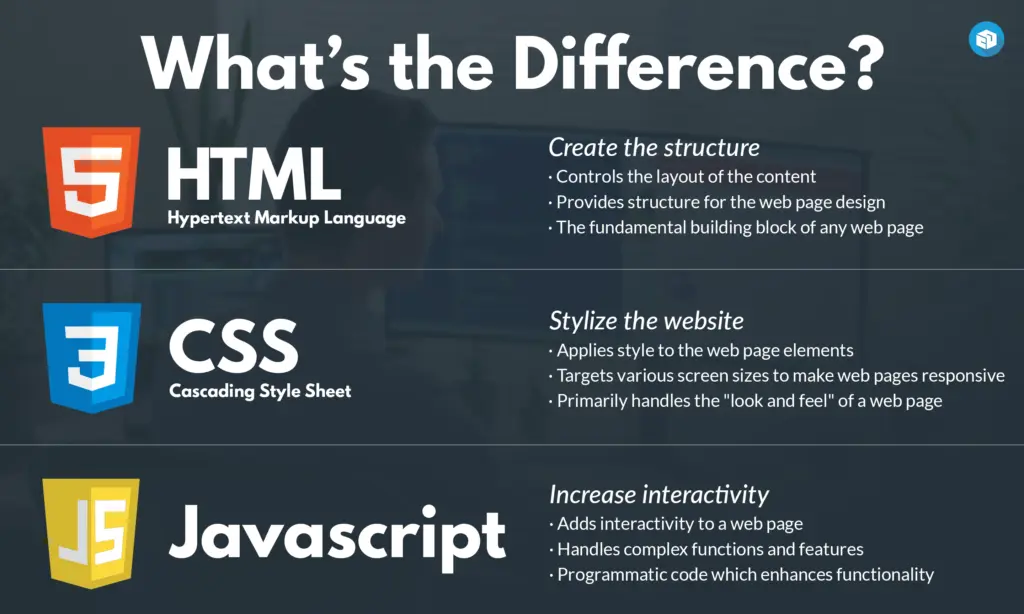
For example, if we wanted to add a button to our page, we would use HTML to create the button and give it a label. We could then use CSS to change its color. Next week, we'll use JavaScript to make something happen when a button is clicked.
To write these files, we'll use a code editor. The browser reads the files and displays the page. This is helpful because we can make a change in the editor, save it, and see what it does in the browser. For now, the page only exists on your computer. Opening it does not put it online.
Getting started
If you haven't set up your editor yet, follow the setup checklist. It also has a browser option if you can't install the editor. Ask for help if either option is giving you trouble.
- Create a folder called
practice-pagesomewhere you can find again. - Open the folder in your editor and create two empty files,
index.htmlandstyles.css. - Save the supplied avatar image into that folder as
avatar.svg. If the link opens the picture, use the browser's save option or ask for help downloading it.
The file endings matter. index.html contains our HTML, and styles.css contains our CSS. Make sure the editor hasn't added .txt to either name.
When you edit a file, you need to save it before the browser can see your changes. Then refresh the browser to reload the saved version.
An HTML document has a head and a body. The head contains information about the page, while the body contains what people will see. Add this to index.html:
<!doctype html>
<html lang="en">
  <head>
    <meta charset="utf-8">
    <meta name="viewport" content="width=device-width, initial-scale=1">
    <title>My first page</title>
    <link rel="stylesheet" href="styles.css">
  </head>
  <body>
  </body>
</html>
Here, title sets the text on the browser tab. The link line tells the browser to load styles.css, which is still empty. We'll add to it once we have some content on the page.
The other lines tell the browser how to read the document. <!doctype html> tells it to read the document as modern HTML, and lang="en" says that the page is in English. charset="utf-8" helps the browser read our letters, punctuation, and other text characters correctly. The viewport line makes the layout use the screen's width on mobile devices.
Save the file, find index.html in your computer's file manager, and open it in a browser. You should see a blank page with "My first page" on the tab. The page is blank because we haven't put anything inside the body yet.
HTML elements
We'll start with a heading and a paragraph. Add the following between <body> and </body>:
<main>
  <h1>Hello, I'm Alex</h1>
  <p>I'm a student at Stevens.</p>
</main>
In this example, main identifies the page's main content. Inside it, h1 marks the main heading, and p marks a paragraph. The spaces at the start of the lines make it easier to see that the heading and paragraph are inside main.
Headings also describe how the page is organized. We use h1 for the main heading, then h2 for headings within that page. This is helpful for screen readers, which read pages aloud. Someone using one can move between sections by their headings. If we want a heading to look different, we can change its CSS while keeping the right heading level.
Change Alex to your name or a nickname, then save and refresh. You should see the heading change. Show the person next to you which part of the HTML you edited.
Images and links
An image needs a little more information than a paragraph. We have to tell the browser where to find the image and provide text that describes it. Add this after the paragraph, before </main>:
<img src="avatar.svg" alt="A blue smiling face" width="120" height="120">
<p>I like video games and photography.</p>
The extra information inside the opening tag is called an attribute. src gives the image's location. Since avatar.svg is in the same folder as index.html, we can use its filename. width and height set its dimensions.
The alt attribute provides a text alternative for the image. A screen reader can read it aloud, and the browser can display it if the image doesn't load. If you use a different picture, update this description to match. Unlike a paragraph, img doesn't need a closing tag.
We can also add a link to another page. After the new paragraph, still before </main>, add:
<a href="https://developer.mozilla.org/en-US/docs/Learn_web_development">MDN web development docs</a>
The a element creates a link, and href gives its destination. The words between the tags are what someone clicks. Here, the link takes us to MDN. It explains what HTML elements and CSS properties do and gives code examples. Giving the link a descriptive name helps someone know where it goes before opening it.
Save and refresh again. You should have a heading, two paragraphs, a picture, and a link. Try opening the link, then use the browser's Back button to return. Replace the interests sentence with something about yourself.
CSS
So far, the browser has chosen the default font and spacing for our HTML. We can change those by writing CSS rules in styles.css. Each rule selects part of the page and gives it a set of styles.
Open styles.css and add:
body {
  font-family: system-ui, sans-serif;
  background: #eef2ff;
  color: #172554;
  margin: 0;
  padding: 24px;
}
Here, body is the selector. It tells the browser which element the rule applies to. Inside the braces, { and }, we write a property followed by its value. For example, in color: #172554;, color is the property and #172554 is the value. The colon separates them, and the semicolon marks the end.
This rule uses a system font, gives the page a pale background, and makes the text dark blue. The values beginning with # are color codes. margin: 0 removes the body's default outside space, while padding: 24px adds space inside it. This keeps the content away from the edge of the browser window. px means CSS pixels, the units we're using for these sizes.
Save your files and refresh the browser. You should see the new colors and spacing. If the page still looks the same, check that the HTML links to styles.css and that both files are in the same folder.
We can give main its own styles as well. Add this below the first rule:
main {
  max-width: 600px;
  margin: 0 auto;
  background: white;
  padding: 24px;
  border-radius: 16px;
}
Now the content sits inside a white card. max-width stops the content area from becoming wider than 600 pixels. margin: 0 auto gives it no top or bottom margin and uses automatic left and right margins to center it when there is room. The padding creates space inside the card, and border-radius rounds its corners.
Try changing the padding in this rule from 24px to 48px. Before you refresh, think about which space should get larger. Compare the result, then change it back to 24px.
We can style the individual elements too. Add these rules below the others:
h1 {
  color: #1d4ed8;
}

img {
  border-radius: 16px;
}

a {
  color: #1d4ed8;
}
The h1 rule changes the heading's color, the img rule rounds the image's corners, and the a rule changes the link's color. Each selector affects its matching element. If you changed the color in the h1 rule, would the paragraphs change too?
Keep the supplied colors for now. The dark text is readable against the pale and white backgrounds. Light text on a light background would be harder to read.
Finding answers
Let's say we want the heading's text to be centered, but we want the paragraphs to stay as they are. We know where the heading's styles go, but we haven't learned which CSS property changes text alignment.
Search Google for CSS center text W3Schools and open a result from w3schools.com. Look for the property that controls text alignment and the value that centers it. Then add that property and value to the existing h1 rule in your CSS.
Save and refresh to see whether it worked. Only the heading's text should be centered. Compare your change with someone nearby and explain why you added it to h1. If search isn't working, use the W3Schools CSS text-align reference. You can also use the MDN text-align reference if you want a more detailed explanation.
You can use this approach whenever you need a property you haven't seen before. Start with the change you want to make, look for an example on W3Schools, and try it in your page. If you need more detail about how or why something works, check MDN. Check what the code does before adding more of it.
Common problems
When something doesn't look right, start with the last thing you changed. Fixing one thing at a time makes it easier to tell what caused the problem.
| What you see | What to check |
|---|---|
| Old words or colors | Save the edited file, then refresh the correct browser tab. |
| Raw HTML text instead of a page | Check that the file is named `index.html`, and open it in a browser. |
| Content appears, but none of the styling does | Match `href="styles.css"` to the exact filename and folder. |
| A broken picture | Check that `avatar.svg` sits beside `index.html` and matches `src`. |
| One CSS rule does nothing | Check its selector, colon, semicolons, and both braces. |
| Strange text or links | Check that quotes and opening and closing tags are paired. |
If you're asking for help, show the code and the browser together. Explain what you expected to happen and which change you made. That gives the other person a place to start looking.
Before next week
Save your work and keep the entire practice-page folder. Next week, we'll add a button and use JavaScript to make it respond when clicked.
If you have time left, add a section called "Something I want to build" using h2 and a paragraph. Give the heading its own CSS rule.
The completed example is available if you want to compare files or need help catching up. It includes the centered heading from the search exercise.
Resources
Start with W3Schools for examples and quick references. Use MDN when you want a more detailed explanation or additional technical information.
W3Schools
- W3Schools: HTML Introduction
- W3Schools: HTML Headings
- W3Schools: HTML Images
- W3Schools: CSS Syntax
- W3Schools: CSS Padding
- W3Schools: CSS text-align
No comments to display
No comments to display